For contractors and developers · Reception plan · Preview
Only receive IFC models that already pass for contractors and developers who receive models from subcontractors
Publish your requirements as one link. Each subcontractor checks their model against it for free, in the browser, and fixes it before sending. You see who delivered, what passes and why the rest goes back, with a report ready for the client.
Preview: the Reception plan is designed and shown here with sample data. It is not on sale yet and nothing is saved. Checking a model is free and works today.
The problem
Bad models are found by whoever receives them
Under ISO 19650-2, reviewing and accepting the information model is an activity of the appointing party: the contractor or developer who receives it. The UK BIM Framework guidance describes that check as part of the common data environment workflow.
Skanska UK says its goals depend "critically" on getting quality information from its supply chain. Contractor BIM managers describe considerable difficulties getting information down and back up the chain by email and FTP.
In practice a coordinator opens each delivery, finds the same missing properties and wrong names, writes the reasons by hand and waits for the next version. The subcontractor only learns the rules after being rejected.
Sources: UK BIM Framework, Guidance Part C (read on ), solibri.com, Skanska UK case (read on ), Construction Management (read on )
How it works
From your requirements to the client report
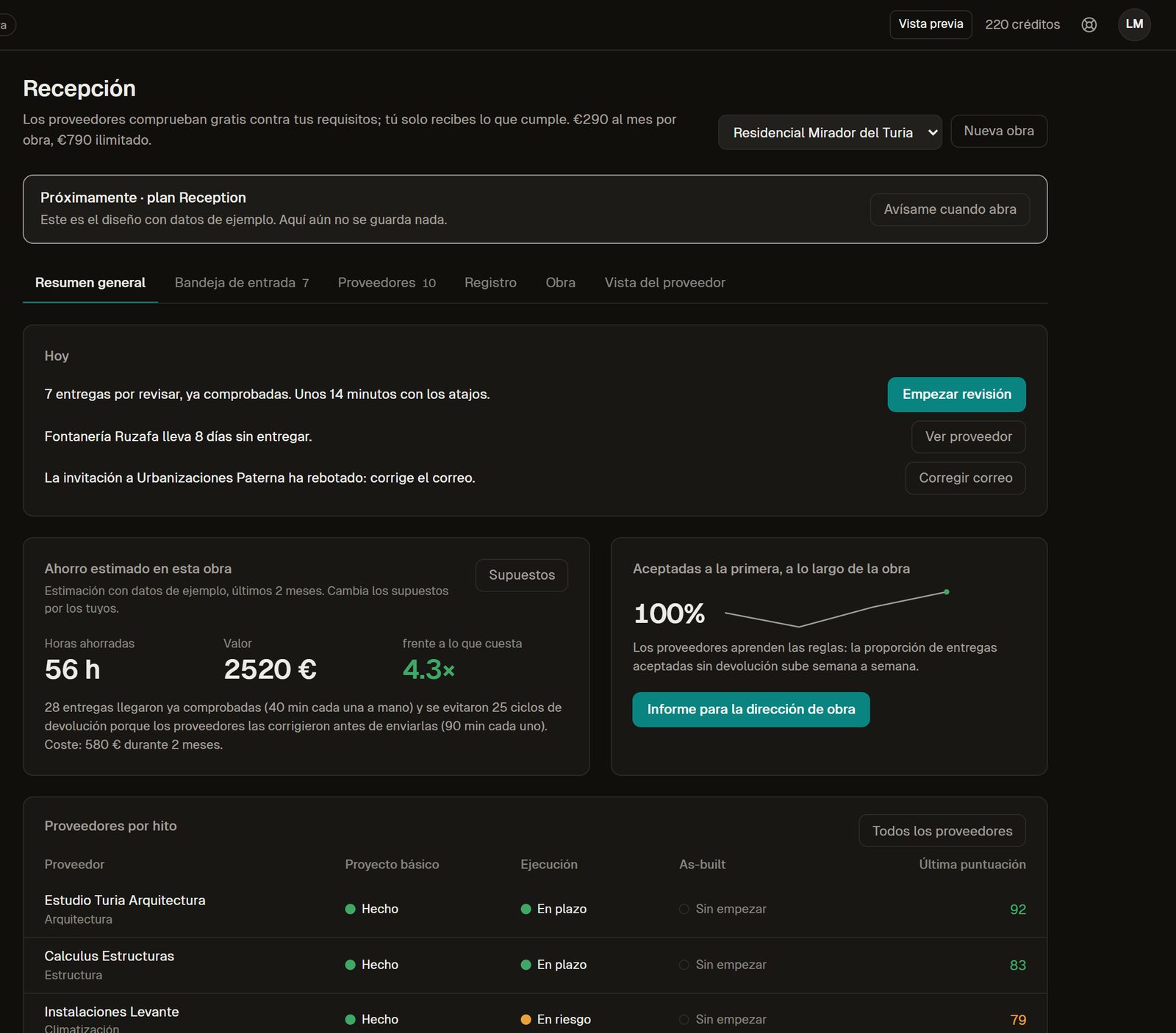
Every capture below is the Reception design with sample data (project "Mirador del Turia", ten suppliers). The interface is in Spanish.
-
Preview
Publish your requirements as a link
Rules, IDS and minimum score by ISO 19650 status. Subcontractors get the approved version; an older link keeps working.
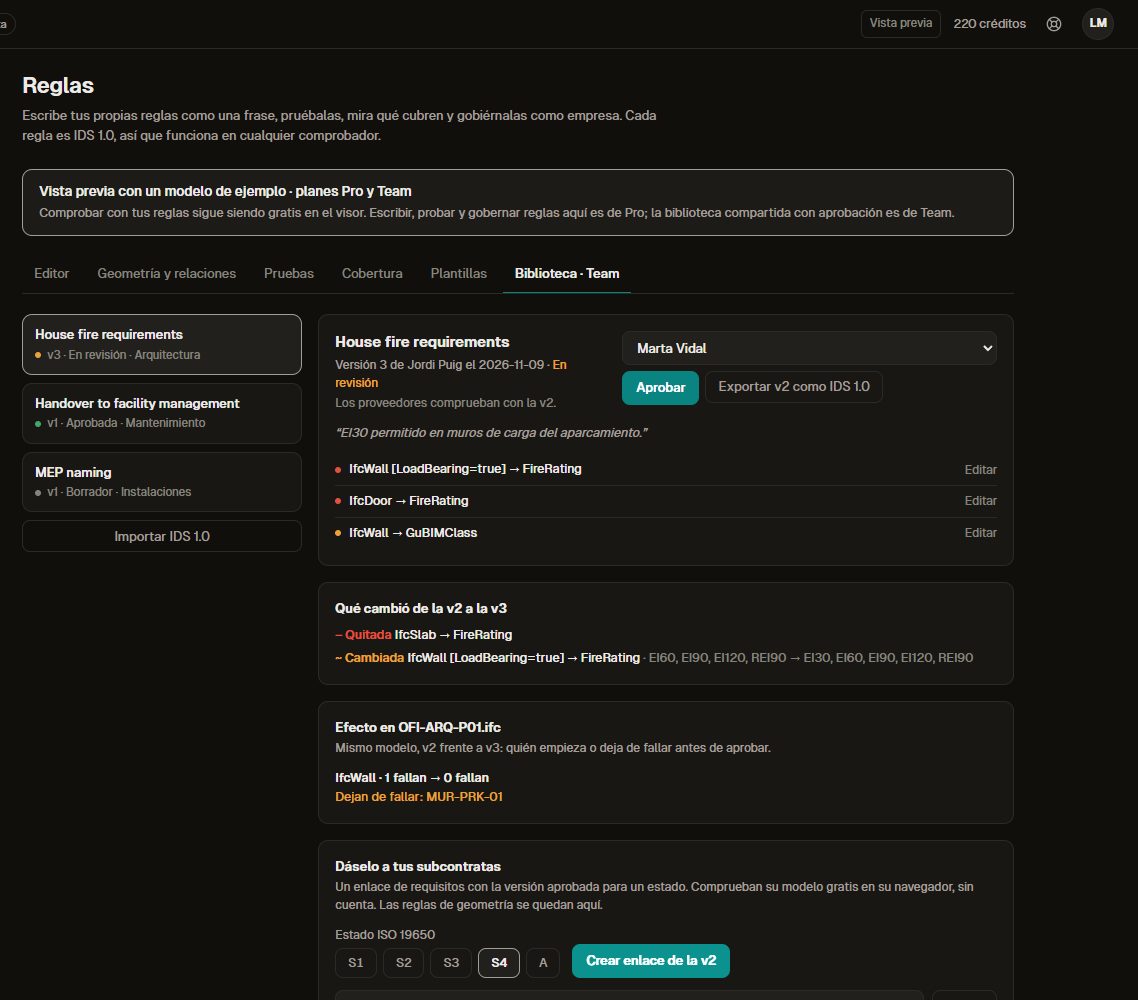
What changes between rule versions and the link that goes to subcontractors. -
Preview
Subcontractors check for free before sending
No account. They see the score, what fails, the elements involved and the fix guide for each rule, so most errors are fixed before they reach you.
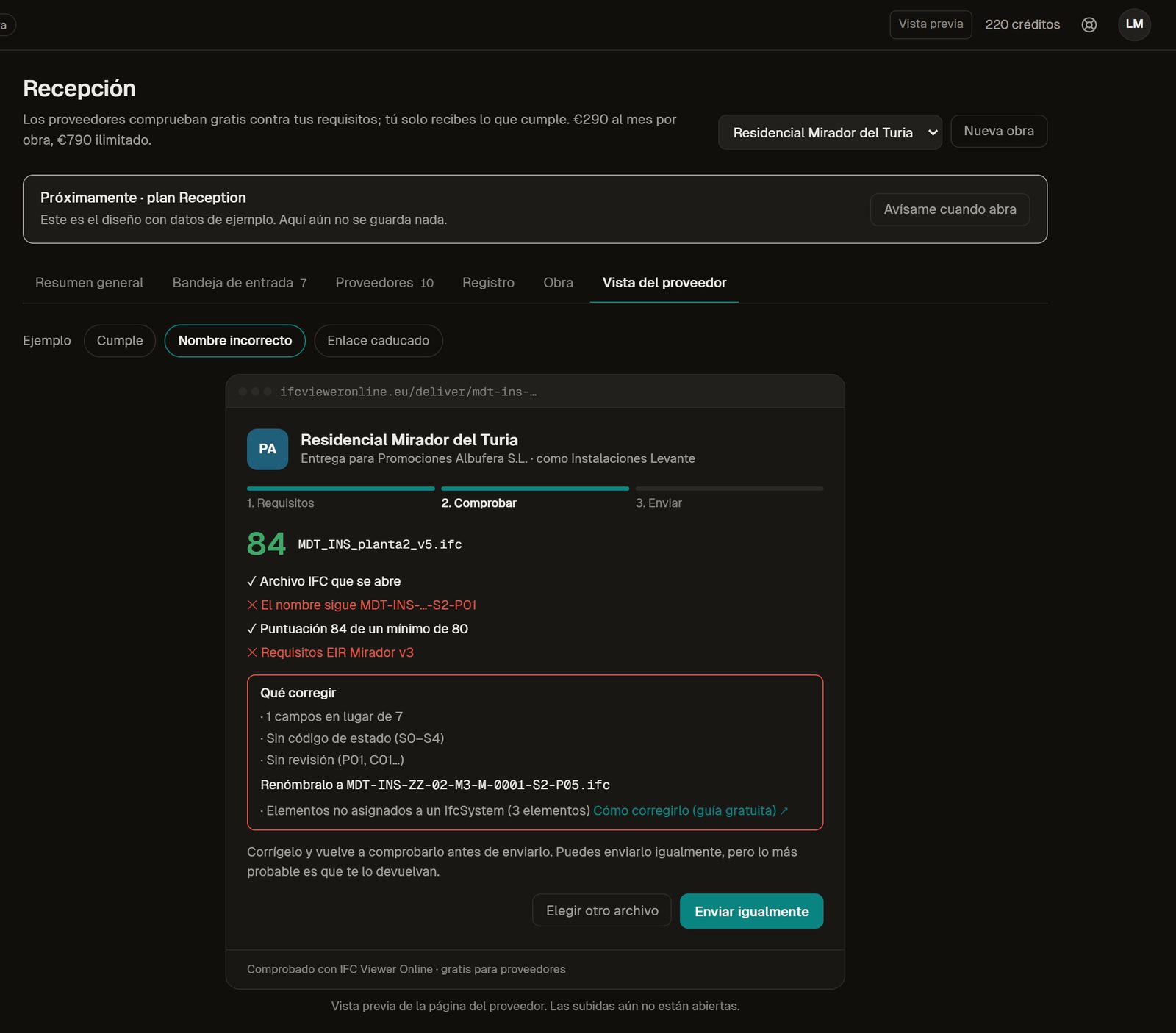
The page a subcontractor sees: what passes, what fails and how to rename the file. -
Preview
Review a queue, not an inbox
Deliveries arrive already checked, with the file name read against ISO 19650 and a before-and-after against the previous version. Keyboard shortcuts take you through the queue.
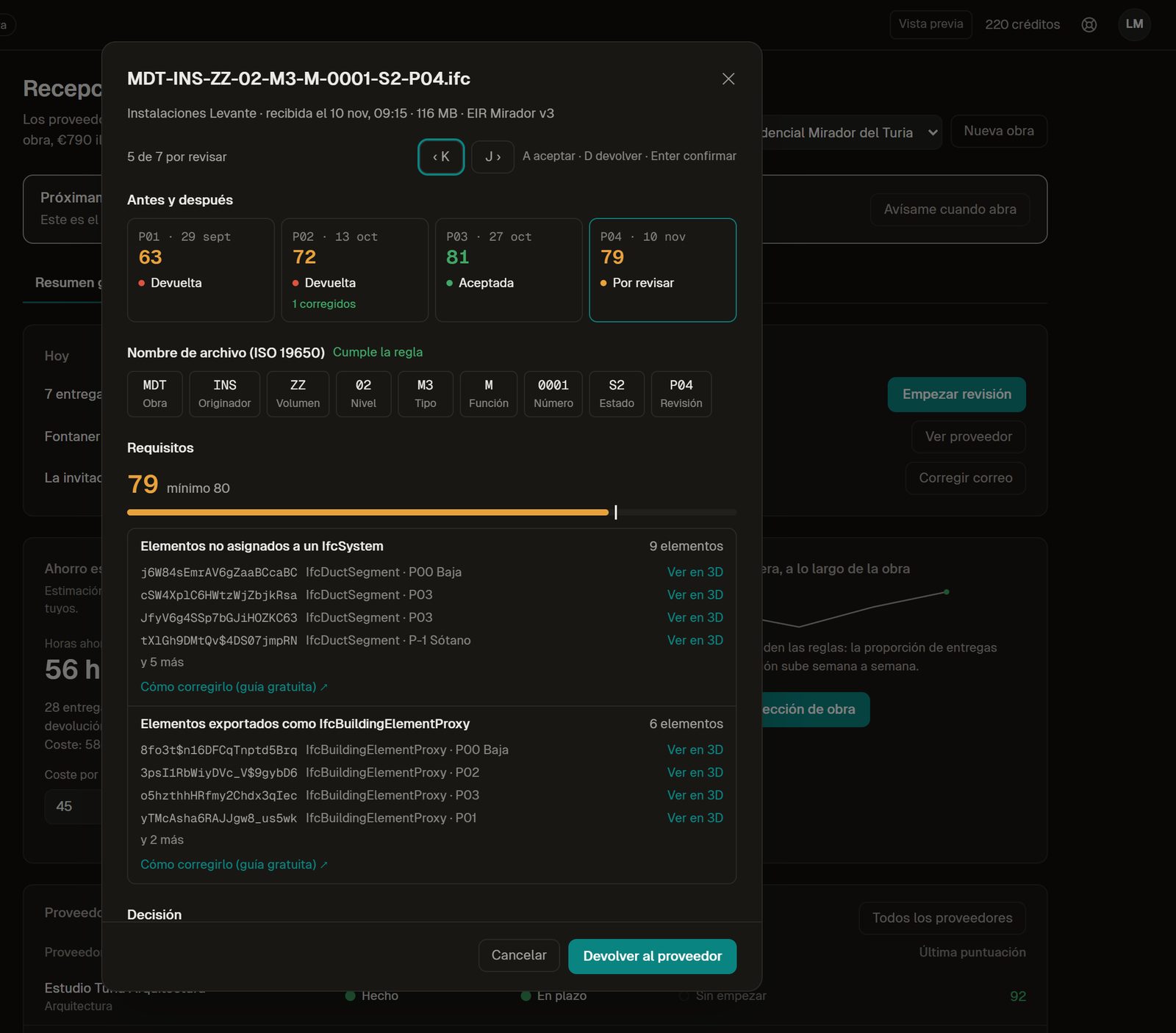
One delivery: its versions, its file name field by field and its requirements. -
Preview
Return it with reasons the supplier can act on
Each reason points to the elements in 3D and to how to fix them. Everything is logged with a chained hash and exported to CSV.
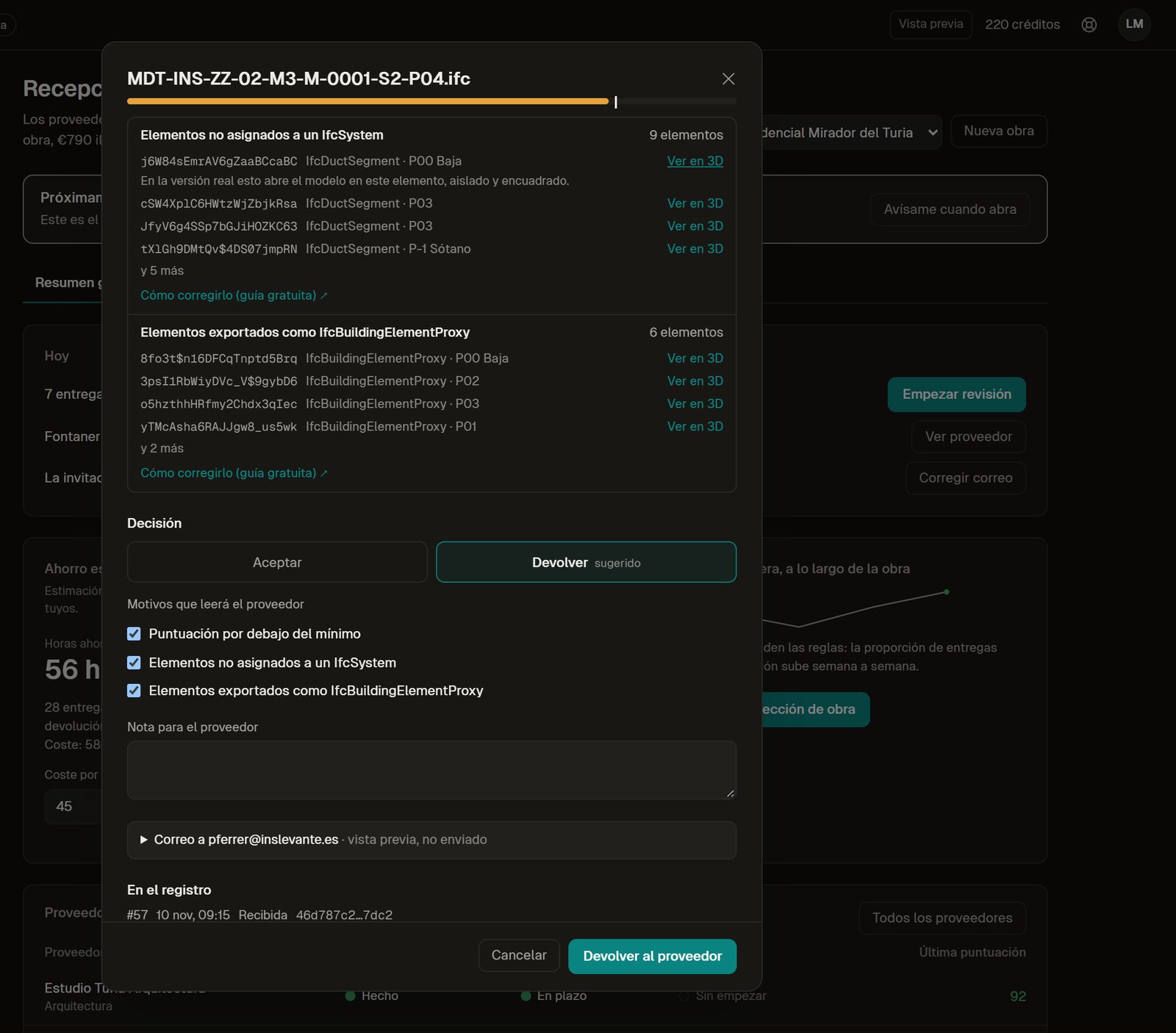
Returning a model: the reasons, the elements and a note for the supplier. -
Preview
See clashes between disciplines over time
Clash runs in the browser, ordered by estimated cost, with the trend between runs.
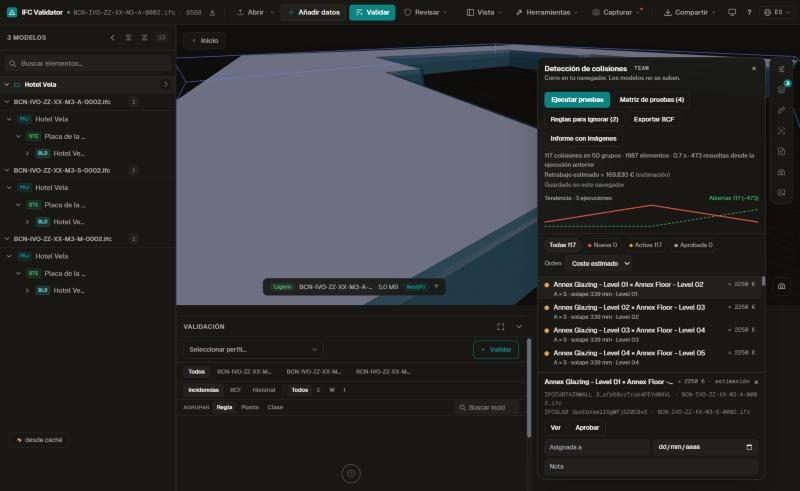
Clashes with their trend and estimated cost (federated sample hotel). -
Preview
Keep the client informed without writing it
A project page with the latest score, accepted deliveries, resolved clashes and the next milestone. Sending is simulated in the preview.
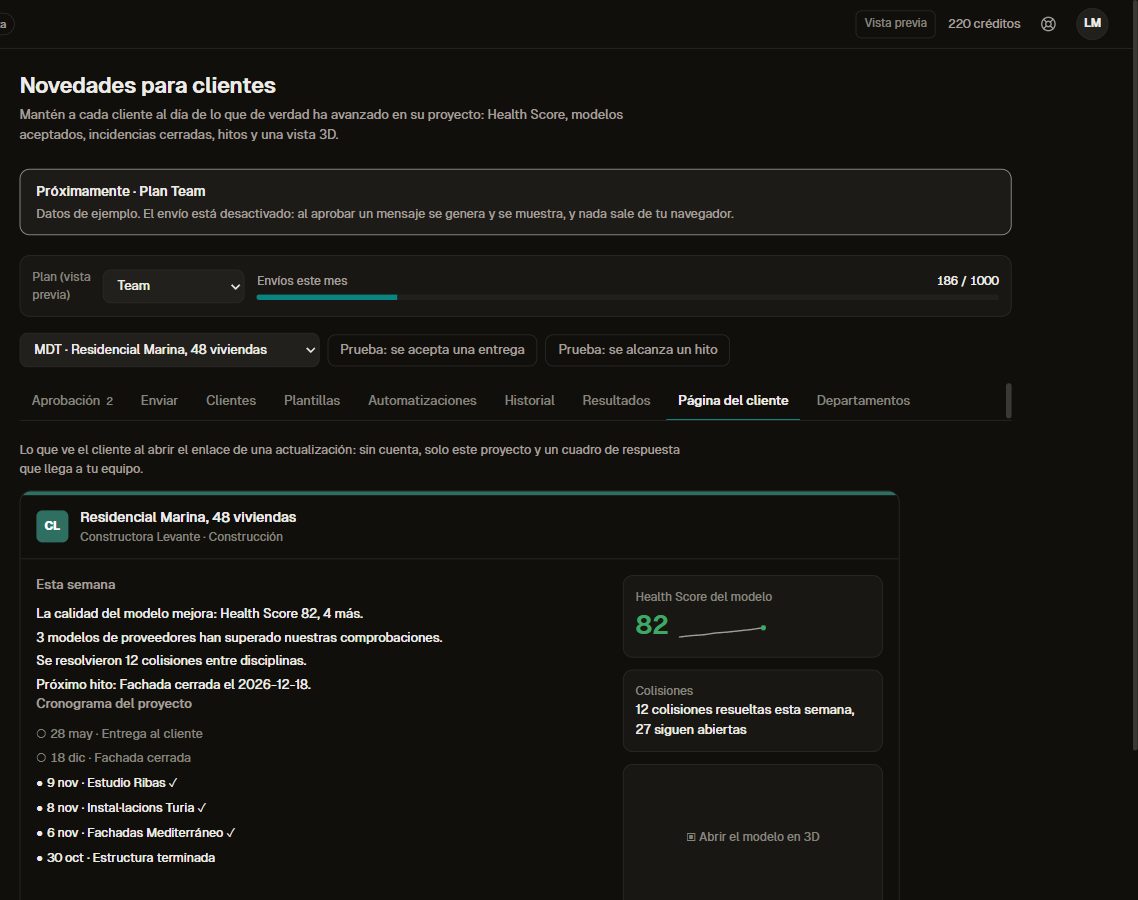
What the client sees when opening the update link. -
Preview
Send the weekly report to site management
Received, passed, missing and the estimated time saved, written for you to copy or download.
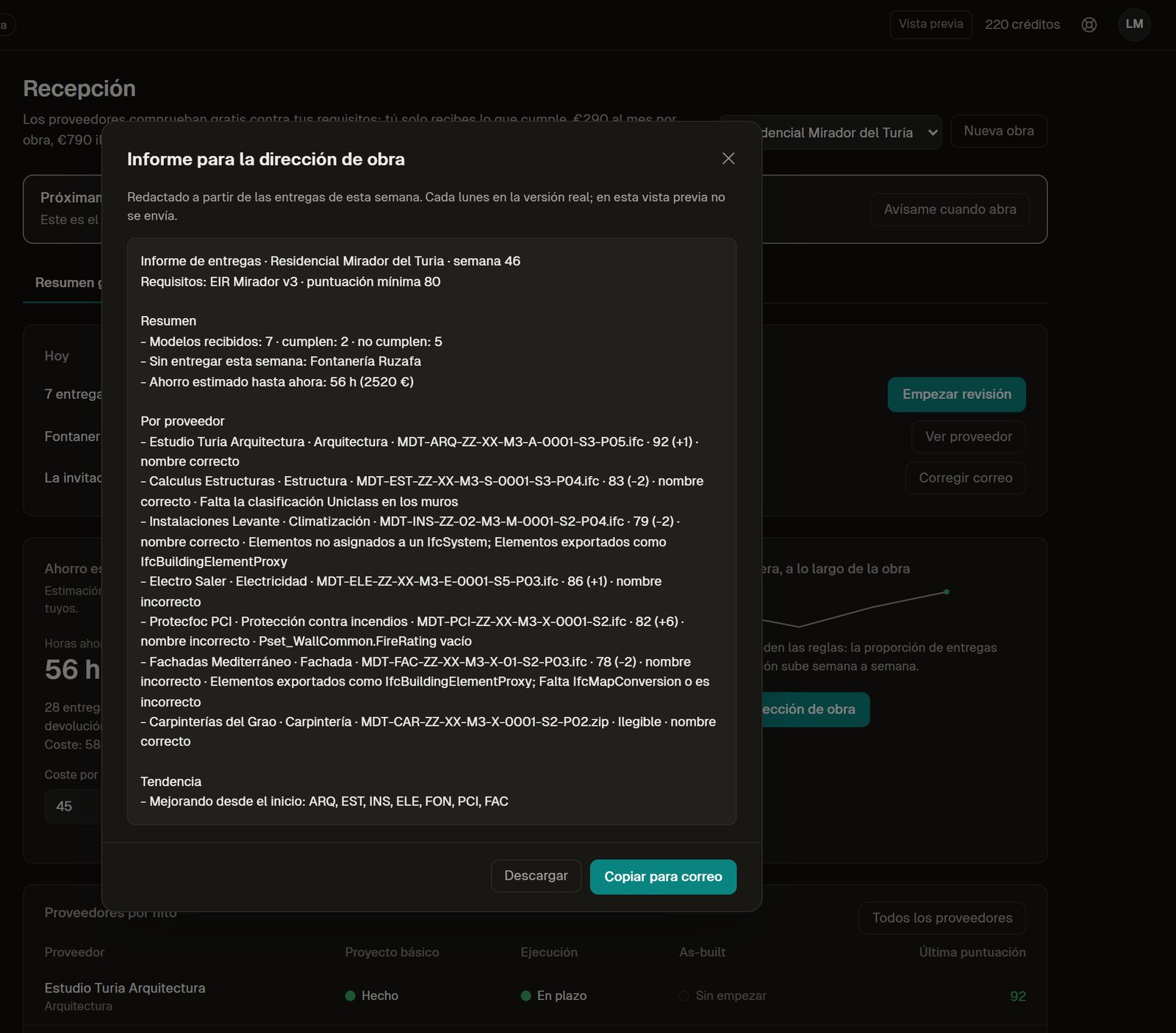
The weekly report, generated from the deliveries.
Estimated savings
About 22 hours a month of a coordinator, by our assumptions
An estimate, not a measurement. Change the numbers for yours: the Reception overview lets you edit every assumption.
| Task | Assumption | Share saved (assumed) | Minutes a month |
|---|---|---|---|
| Reviewing deliveries by hand | 40 deliveries × 25 min | 80 % | 800 |
| Preparing the clash meeting | 4 meetings × 90 min | 70 % | 252 |
| Writing the client report | 8 reports × 45 min | 80 % | 288 |
| Total | 1,340 min ≈ 22 h |
At €45 an hour that is about €1,000 a month. The Reception plan is planned from €290 per project a month, so by these assumptions it pays back about three times its cost. Rework and penalties avoided are not counted.
Comparison
Next to a common data environment
Each vendor column says only what that vendor's own page said on the day we read it. Where a page says nothing, the cell says so.
| Catenda Hub | Dalux Box | Autodesk Construction Cloud | IFC Viewer Online Reception (preview) | |
|---|---|---|---|---|
| Published price | Per project, by construction value: about €400 a month for a €10M project, about €1,100 for €50M; quote on request | None on the product page; contact form | None; a quote per bundle, with user, project and account-based pricing | Planned: from €290 per project a month with 15 suppliers, or €790 unlimited. Not on sale yet |
| Suppliers need a licence | No: "Your subs don't need a licence to log a defect" | Not stated on the page | Not stated on the page | No account: they check for free in the browser |
| Checking models against requirements | Not stated on the pricing page | Yes: validate model data and geometry against project requirements | The Model Management bundle lists model conditioning, coordination and clash detection | Rules and IDS 1.0 with a score per delivery. Checking is free today; the inbox is in preview |
| Approval of received models | Not stated on the pricing page | Approval workflows and an enforceable file naming convention | Not stated on the pricing page | Accept or return with reasons and 3D elements (preview) |
This is not a replacement for your CDE. It sits before it: whatever CDE you use, the model arrives already checked against your requirements, and the supplier knew them before sending.
Sources: catenda.com/pricing (read on ), dalux.com/dalux-box (read on ), construction.autodesk.com/pricing (read on )
Free and preview
What works today and what is a preview
Free, available today
- Opening and checking any IFC in the browser, nothing uploaded
- Your IDS 1.0 files and 44 rules with a Health Score
- BCF import and export, comparing versions
- The fix guides for every rule
Reception plan, in preview
- Requirements link with versions per ISO 19650 status
- Delivery queue with accept or return and reasons
- Supplier record and log with chained hash
- Client page and weekly report
FAQ
Questions buyers ask
Can I use Reception today?
Not yet. It is designed and shown with sample data. If you receive models from subcontractors, talk to us: we are looking for a few pilot projects. Checking a model against your requirements is free and works today in the viewer.
Do subcontractors pay or need an account?
No. They open your link and check their model for free in the browser. Paying is for whoever receives and manages the deliveries. How the upload page works: an upload page for suppliers without an account.
Does it replace Catenda, Dalux or Autodesk Construction Cloud?
No. It checks the model before it reaches your CDE and works whichever CDE you use. Each CDE has its own workflow; see the comparison above with the date we read their pages.
Is the model uploaded to check it?
For the free check, no: it runs in the subcontractor's browser. In Reception, the delivery you accept is stored for you in the EU.
How much will it cost?
It is planned from €290 per project a month with 15 suppliers, or €790 for unlimited projects. Prices may change before launch; see the plans.
Where does the savings figure come from?
From the assumptions in the table above: number of deliveries, minutes per task and the share each task saves. They are assumptions, not measurements, and you can change them in the overview.
Sources: catenda.com/pricing (read on ), dalux.com/dalux-box (read on ), construction.autodesk.com/pricing (read on )
Related
Receiving models from subcontractors?
Tell us how many projects and suppliers you have. We are choosing a few pilot projects for Reception.
Talk to us