IFC Viewer Online · Back to the BIM & IFC blog
Tools & comparisons · 2026-11-12 · 8 min
IFC Clash Detection in the Browser: What You Can Do Without Navisworks (and What You Cannot)
Finding clashes is the easy part. Finding the ones that matter, and keeping them from coming back as "new" after every export, is the work. A preview of clash detection that runs on the IFC files in your browser.
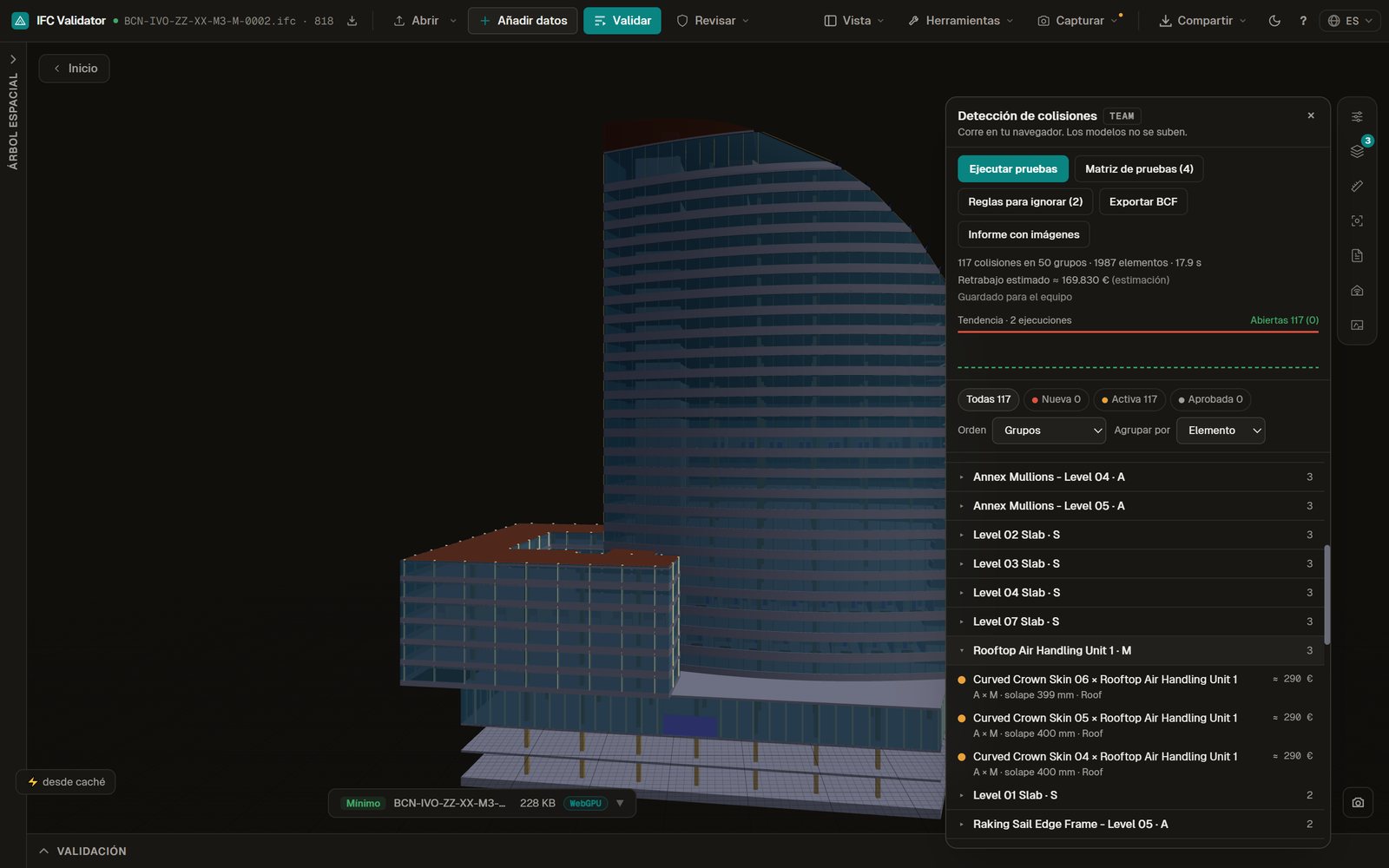 Clash detection in the browser on the three Hotel Vela IFC models: 117 clashes in 50 groups, listed next to the 3D model
If you coordinate architecture, structure and MEP models, you know how it goes: you run the clash test, four thousand results come out, and at Thursday's meeting nobody knows where to start. The problem is rarely finding clashes. It is finding the ones that matter, and keeping them from coming back as "new" every time someone exports the IFC again.
This post explains how the clash detection we are preparing for IFC Viewer Online works: it runs entirely in the browser, the model never leaves your computer, and it works on the IFC files directly, with no conversion to another format. It also says where it falls short of desktop tools.
Key takeaways
- Hard and clearance tests, triangle against triangle, organised in a matrix you can save.
- Ignore rules hide the noise: 1,569 of 4,827 results on a real tower.
- Each clash is tracked by its test and the GlobalId pair, so states survive a new version.
- In preview: nothing here is open yet, and what is free today stays free.
The problem: 4,827 clashes and hardly any matter
We tested a real 94 MB IFC (the Shanghai Tower: 2,134 elements and 1.44 million triangles), all against all. Result: 4,827 clashes in 1,069 groups. Almost all of them were the façade against its own mullions and transoms, which in that file come as separate elements and not as parts of the curtain wall.
 Design preview with sample data, Spanish interface. Geometry read in 0.7 s and tests in about 8 s on a laptop, with no server.
A tool that finds a lot of clashes is not doing you a favour. What counts is how fast you get to the short list.
Hard and clearance tests, organised in a matrix
There are two kinds of test:
- Hard: two elements pass through each other. It is tested triangle against triangle, not only with bounding boxes, so a pipe that runs past a beam without touching it does not count.
- Clearance: two elements are closer than allowed (for example, 50 mm between services and structure).
Tests are arranged in a matrix: which model or discipline against which, which IFC classes and systems, with what tolerance. The matrix is saved and reused on the next project, and there are templates per building type (housing, offices, hospital, industrial, infrastructure) that only create the tests for the disciplines you have loaded.
 Design preview with sample data, Spanish interface.
On the federated sample model (Hotel Vela: architecture, structure and MEP, 1,987 elements) the default matrix finds 117 clashes in 48 groups in 2.2 seconds: the roof against the air handling unit, the curtain wall against the slab, supply risers 1 mm from the slab. What you would expect to find.
Removing the noise with ignore rules
Back to the tower. Two rules switched on by default, "insulation against wall or slab" and "façade against its framing", hide 1,569 of the 4,827 results. Others can be switched on (finishes against slab, same class, overlaps under 20 mm, furniture), and you can write your own by IFC class and by words in the name.
 Design preview with sample data, Spanish interface. Rules hide, they do not delete: you can show what is hidden at any time.
States that survive a new version
This is what saves the most time on a live project. Each clash is identified by the test and the pair of GlobalIds of its two elements, not by the session or the file. So:
- If the pair no longer clashes in the next version, it becomes resolved by itself.
- If you marked it approved (accepted as it is), it stays approved even if the file changes.
- The ones still there go from "new" to "active", and only what is really new shows as new.
Each run adds a point to a trend chart (open, new, resolved, approved, hidden), which is the first thing to show at the weekly meeting. In one test we moved the MEP model 60 cm between runs: 117 → 590 (473 new) → 117, with "473 resolved since the previous run", and the original 117 kept their state.
 Design preview with sample data, Spanish interface.
The list can also be ordered by the estimated cost of resolving each clash: a pipe through a concrete beam costs more than a cable grazing a suspended ceiling. It is an estimate (the cheaper element is the one that moves; it goes up when the clash is deep or goes through structure), and the screen marks it as such. It is not a quotation.
An honest note: identifying by GlobalId only works if your authoring tool keeps GlobalIds between exports. If they change on every export, read why IFC GUIDs change on every export first.
From the clash to the person responsible
Click a clash and the viewer isolates the two elements and takes the camera to the point of contact. From there:
- Pro: export the clash as BCF 2.1 or 3.0, with camera and components, and open it in BIMcollab, Solibri or Navisworks.
- Team: assign it to a person with a due date (it travels in the BCF as AssignedTo and DueDate), and the whole team sees the same states.
 Local test of the workspace on our own server with the Hotel Vela test models (real IFC files), Spanish interface. Not open yet. Assigning, sharing states and creating issues belong to the Team plan.
Not sure whether to use BCF 2.1 or 3.0? We have a comparison of how each stores the camera.
A report you can show
The coordination report carries the 10 most expensive clashes with their pictures, the trend, the estimated total and the breakdown by test, storey and person. It is printable HTML: save it as PDF and attach it to the minutes.
 Design preview with sample data, Spanish interface.
The list can also be reviewed on a phone: only the rows on screen are drawn. With the 4,827 results of the tower, sorting, filtering or changing a state takes under 100 ms.
 Design preview with sample data, Spanish interface.
And the client finds out without opening the model (preview, Team)
The same figures from the trend can go into the update the team sends to the client: "12 clashes resolved this week", with a link to a project page where they see the summary and the 3D view and can write a question that comes back to the team as a thread. They do not need an account.
 Design preview with sample data, Spanish interface. Sending is switched off.
Beyond two elements touching (preview)
Some geometric checks are not clashes between disciplines but project rules: free clearance in front of doors, or the clear height of spaces. They use the same geometry as clash detection and are written as rules, next to the data rules. We will cover them in a post about custom rules.
 Design preview with sample data, Spanish interface.
How it compares
Prices from the official pages, read on 12 November 2026. Where we could not read an official price, we do not give one. [solibri-pricing]
| Navisworks Manage | Solibri | BIMcollab Zoom | IFC Viewer Online (preview) |
|---|
| Hard / clearance | Yes / yes | Yes (component and clearance rules) | Yes / yes | Yes / yes, triangle against triangle |
| Saved test matrix | Yes (Clash Detective, XML) | Rulesets | Rulesets | Yes, by model, class and system; JSON |
| States between versions | Tied to the NWF file | Per session | Per BCF issue | Tied to the GlobalId pair |
| Installation | Windows | Windows / Mac | Windows | Browser, nothing to install |
| Is the model uploaded? | No (local) | No (local) | No (local) | No: computed in your browser |
| Price | See the Autodesk store | From €1,428/year (Essential) or €2,109/year (Advanced), per licence | See bimcollab.com | Planned: Pro from €39/month; coordination in Team from €59/editor |
Sources: solibri.com/pricing, read on 12 November 2026. Navisworks and BIMcollab Zoom did not show a price we could read on their official sites that day. Our planned prices are on the pricing page.Where we fall short (and say so)
- Very large models: the browser has a memory ceiling. Above 1 to 2 GB, a desktop tool works better.
- No penetration tolerance per rule in the style of Solibri.
- No maintenance zones (free space to reach a piece of equipment).
- The first cold run is slower (about 27 s on the tower) than the following ones.
What you can already do for free
None of this takes away what is already free: opening and federating several IFC files, colouring by discipline, importing and exporting BCF, comparing versions and checking each model with its Health Score. Clash detection is a new tool and it will be paid. For a broader comparison with Solibri, see the Solibri alternative page.
Want to try it when it opens?
Clash detection is in preview. If you coordinate models and want to try it with your own IFC files before anyone else, join the waitlist and we will write when it opens. If your team coordinates several projects and you would rather see it on a call, talk to us.
References
- Solibri pricing — Solibri. Plans and starting prices per licence per year, as published on 12 November 2026.
- IFC Viewer Online plans — IFC Viewer Online. Planned prices of the paid plans, which are not open yet.
IFC Clash Detection in the Browser: What You Can Do Without Navisworks (and What You Cannot)