IFC Viewer Online · Back to the BIM & IFC blog
Delivery & ISO 19650 · 2026-11-12 · 7 min
How to Review Your Subcontractors' IFC Models Before They Reach Your Desk
Reviewing faster is not the answer. What arrives on your desk should already be checked. The free requirements link your suppliers use today, and a preview of the receiving side.
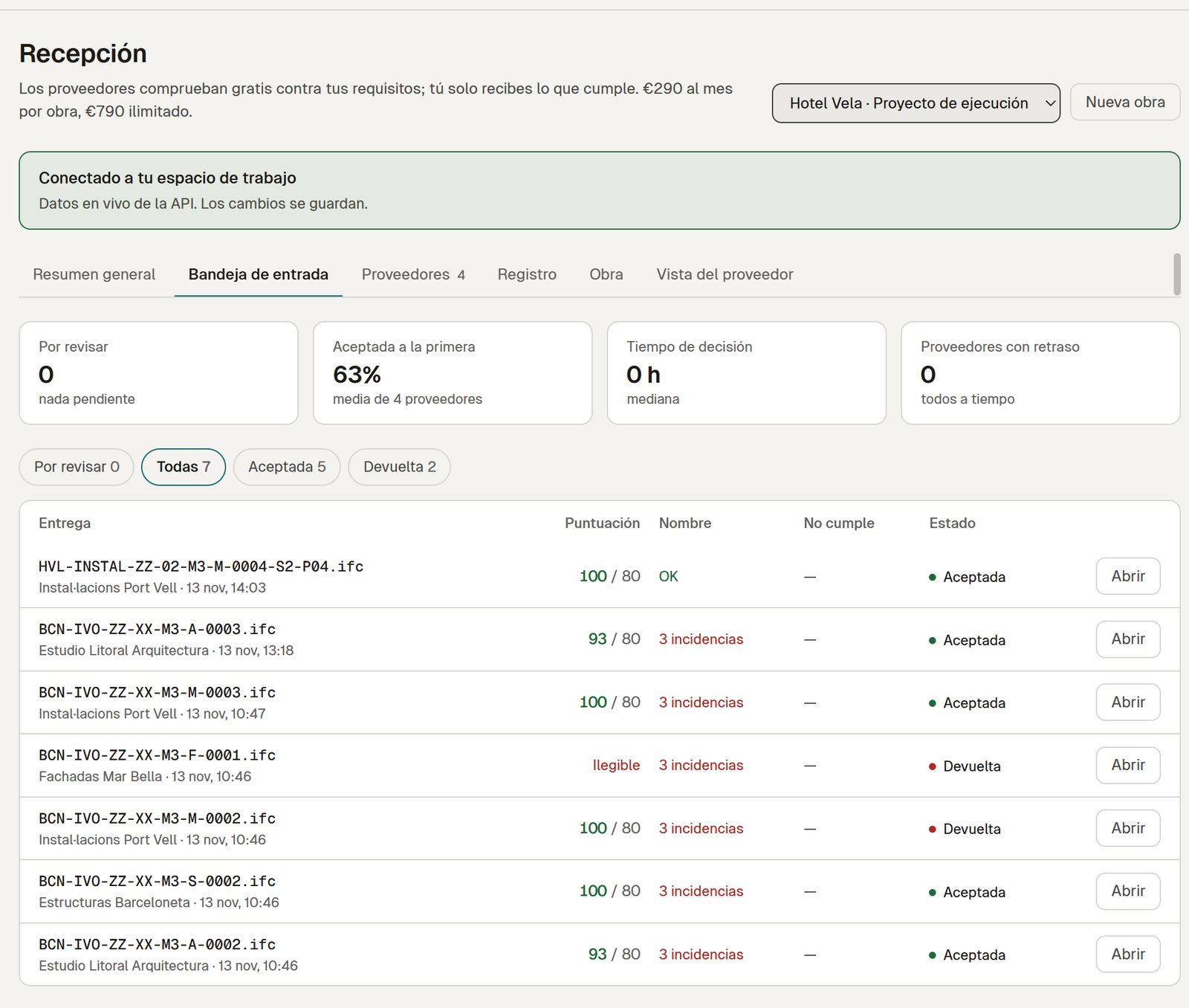 Reception inbox of one project with seven IFC deliveries from four suppliers: score against the minimum, ISO 19650 name check and whether each was accepted or returned
A mid-sized project has 10 to 15 companies delivering models: structure, MEP, façade, joinery. The IFC files arrive by email, by file transfer or through the CDE. Someone in the technical office opens them when they can, finds that the name does not follow the convention or that classification and system are missing, and sends it back by email. The supplier replies that nobody told them. A week goes by.
You do not need to review faster. You need what reaches your desk to be checked already.
Key takeaways
- ISO 19650 puts review and acceptance on the party that receives the model.
- Free today: a requirements link your suppliers check against before they send.
- In preview: an inbox per project, one-screen decisions, a fingerprinted log and a weekly report.
What the standard asks of the receiving party
ISO 19650-2 puts the review and acceptance of the information model in the hands of whoever receives it: the appointing party checks that the delivery meets what was asked before accepting it. [uk-bim-part-c] In practice that means three checks, in this order:
- The container: file name, status (S0–S4) and revision (P01, C01…) according to the project convention.
- The content: what your EIR or BEP asks for (classification, properties, systems, level of information).
- The decision: accept, or return with reasons, and keep a record.
To pin down what to require, start with IFC acceptance criteria and with which quality clauses to put in the BEP. This post is about the next step: how to receive.
Step 1 (free today): the supplier checks before sending
You create a requirements link with your profile (EIR or IDS rules), the minimum score and your ISO 19650 naming convention. You paste it into the BEP, the tender documents or the email to subcontractors. The supplier opens it, drops their IFC and sees whether you will accept it: the file is checked in their browser and never leaves their computer. No account needed.
If the name or the score fails, they are told before sending, field by field, with a link to how to fix it.
 Design preview with sample data, Spanish interface. Checking with the link is free today; the contractor's branding and the receipt belong to the Reception plan.
The rules are not the same at every stage: S2 does not ask for what S4 asks for. In the company rule library (preview, Team plan) each rule carries its ISO 19650 stage, someone other than the author approves each version, and before a rule changes you see which elements the change affects. The link your subcontractors receive always points to the version approved for the current stage; old links do not break.
With the Reception plan (preview) the same page also delivers the file: the supplier checks it, presses send and gets a receipt with the SHA-256 fingerprint of the file, then sees your decision on their own deliveries. More on that page in an upload page for suppliers without an account.
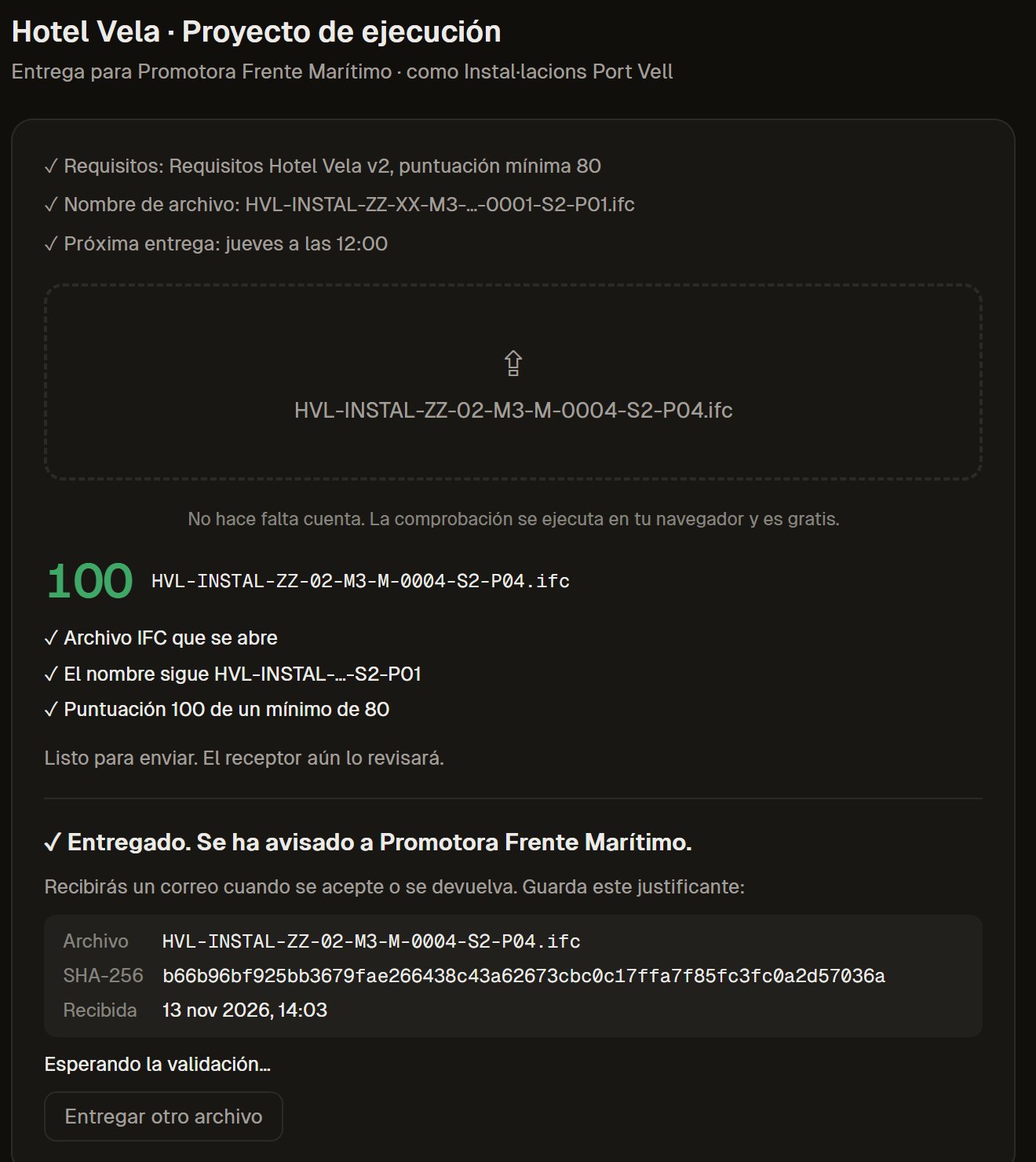 Local test of the workspace on our own server with the Hotel Vela test models (real IFC files), Spanish interface. Not open yet. Server deliveries belong to the Reception plan.
 Design preview with sample data, Spanish interface.
That alone means less rubbish reaches you. The rest of this post is what we are preparing for the receiving side.
The project at a glance (preview)
The first thing a BIM manager needs is not a list of files but how the project is going: which supplier is on track at each milestone (outline, construction, as-built), what needs doing today and how much time is being saved.
 Design preview with sample data, Spanish interface. The time saved is an estimate: its assumptions are shown and can be changed.
Deciding on one screen: reason → element → fix (preview)
When a delivery fails, "IfcSystem: 9 elements" is not enough: the supplier will call you anyway. Each failing rule lists which elements (with GlobalId and storey), a button to see them in 3D and a link to the free guide on how to fix it in their tool (the fix guides).
 Design preview with sample data, Spanish interface.
To review several deliveries in a row there is a queue with keyboard shortcuts (A to accept, D to return, J and K for next and previous) and the history of each delivery: v1 returned, v2 corrected, v3 accepted, with the note of each version.
 Local test of the workspace on our own server with the Hotel Vela test models (real IFC files), Spanish interface. Not open yet.
When you return a delivery, the reasons come pre-selected from the failures themselves; you add a note if you want.
A record of every delivery (preview)
Every delivery and every decision goes into a log with the date, the author and the SHA-256 fingerprint of the file, chained to the previous line. If someone edits a line, the chain breaks and it shows. It exports to CSV, to file in your CDE or for an audit.
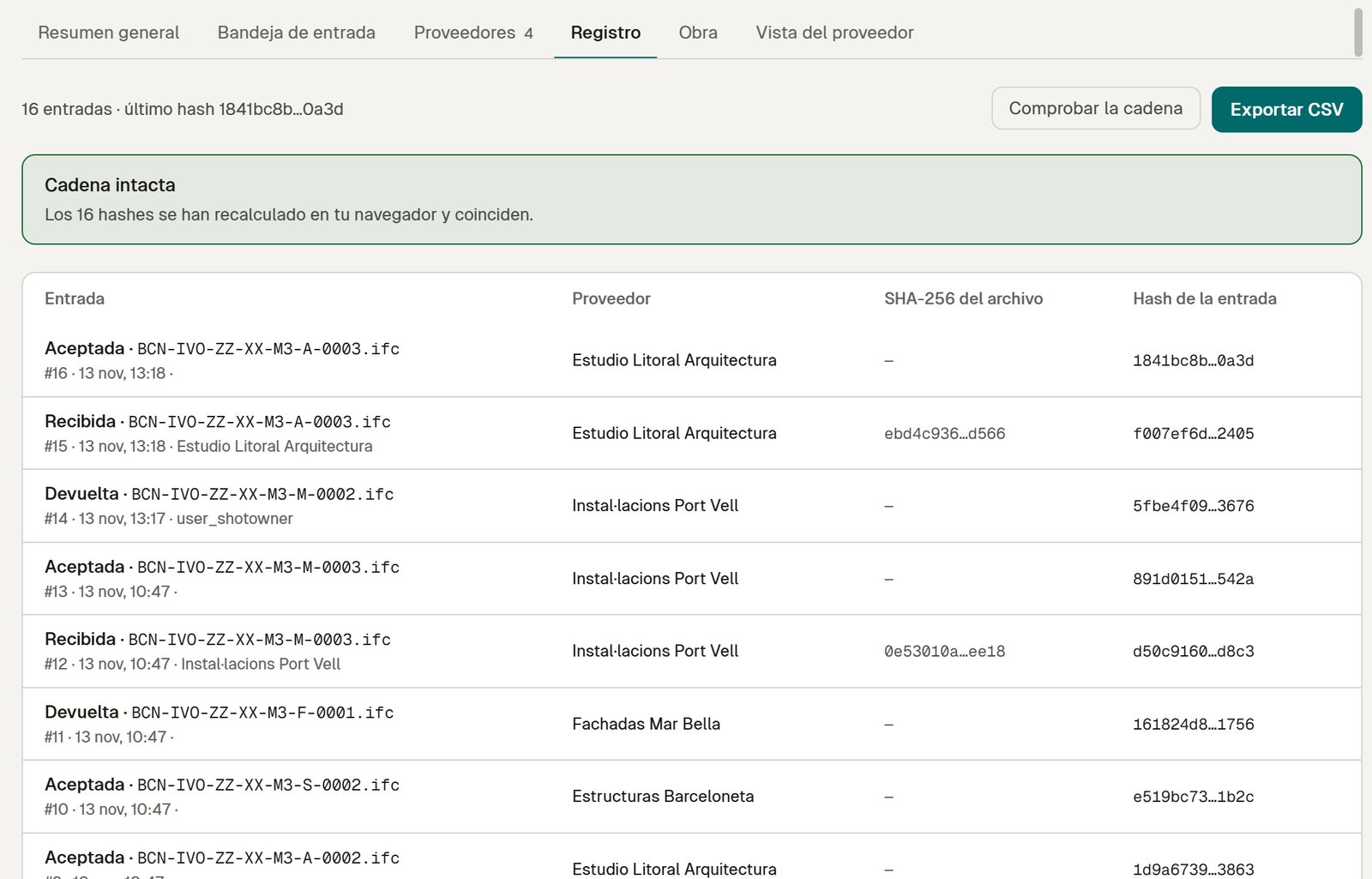 Local test of the workspace on our own server with the Hotel Vela test models (real IFC files), Spanish interface. Not open yet.
It settles what usually ends in an argument: what each supplier delivered, and when.
A report for site management (preview)
On Friday, a summary you can read in three minutes: models received and expected, who complies, what fails, who is improving and what to ask of each one. Ready to copy or print.
 Design preview with sample data, Spanish interface.
And the client gets an update without opening anything (preview)
When a delivery is accepted or a milestone is met, the client can receive an email of fixed sentences filled with the project's numbers (quality, accepted deliveries, next milestone) and a link to a project page, with no account. It is only sent to people who gave their consent, with one-click unsubscribe and no tracking pixel. On the Reception plan the email can come from the contractor's own domain.
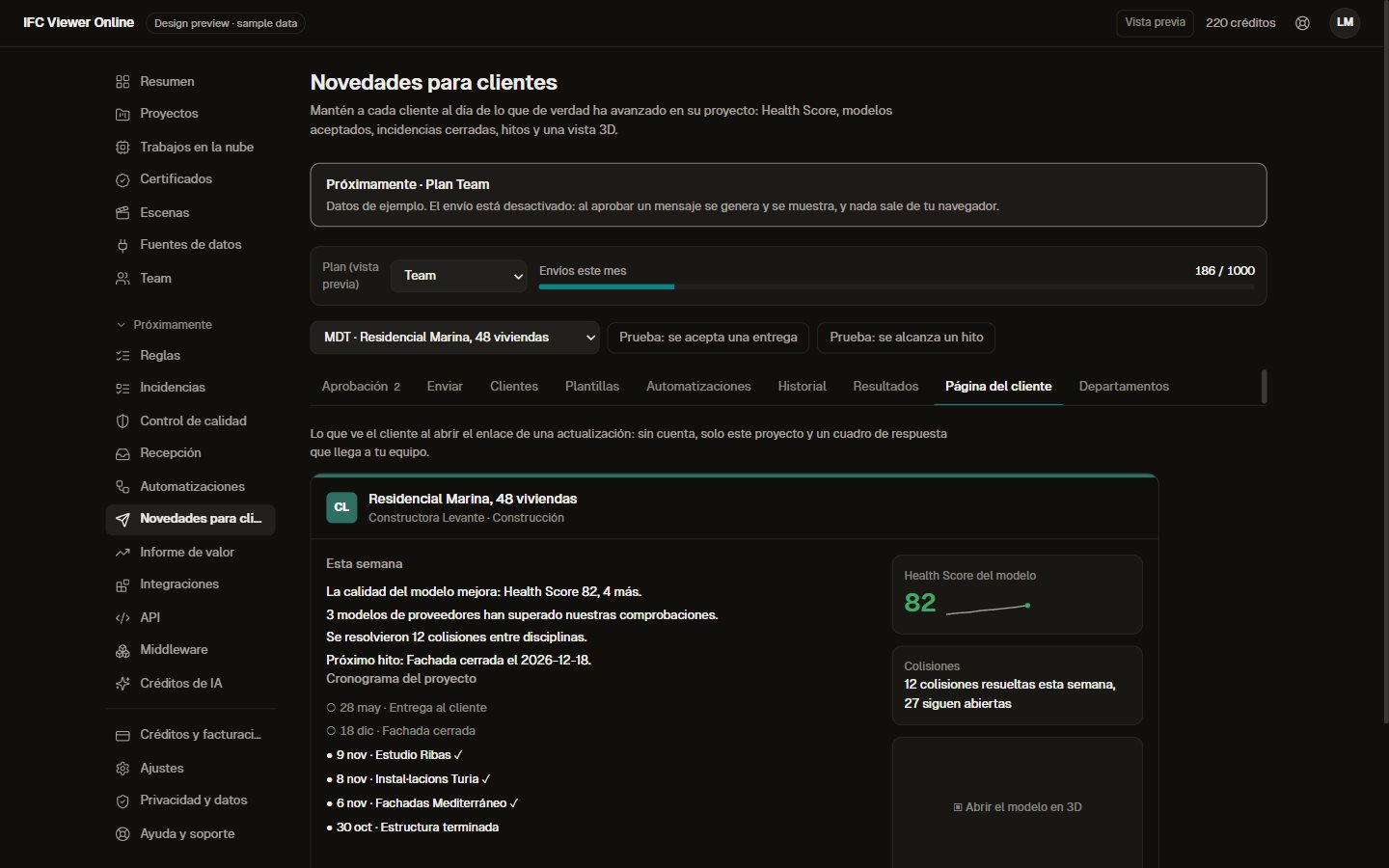 Design preview with sample data, Spanish interface. Sending is switched off.
If you already have a CDE
It does not replace it. CDEs (ACC, Dalux, Catenda…) manage states and documents; what they do not do is let the supplier check their model against your rules, free and without an account, before uploading it. This comes before the CDE: wherever the file comes from, it arrives checked.
What exists today and what is in preview
| Today | Status |
|---|
| Requirements link with your rules and minimum score | Yes | Free |
| ISO 19650 name, status and revision check | Yes | Free |
| Check any IFC with its Health Score | Yes | Free |
| Inbox per project, one-screen decision, queue with shortcuts | No | Preview (Reception plan) |
| Fingerprinted log and CSV, compliance sheet per supplier | No | Preview (Reception plan) |
| Report for site management | In the pilot, prepared by hand each week | Preview (Reception plan) |
| Rules per stage with approval and the effect of each change | No | Preview (Team plan) |
| Automatic update to the client from your domain | No | Preview (Reception plan) |
The Reception plan will be charged per project, not per seat: your 15 suppliers pay nothing. The planned price is on the pricing page. [ivo-pricing]
Do you receive IFC files from other companies on a project?
We are running pilots with a few contractors and developers: we set up the link with your requirements and your naming convention, and each week we send you the report by supplier. If that fits, talk to us for 20 minutes about how you receive models today. Or start now, for free, by checking a model in the validator.
How to Review Your Subcontractors' IFC Models Before They Reach Your Desk