IFC Viewer Online · Back to the BIM & IFC blog
Validation · 2026-11-12 · 5 min
How to Check 30 IFC Files at Once (and Know Which One to Start With)
Opening 30 IFC files one by one and copying each score into a spreadsheet takes an afternoon. A preview of checking a whole folder in the browser, sorted by where to start.
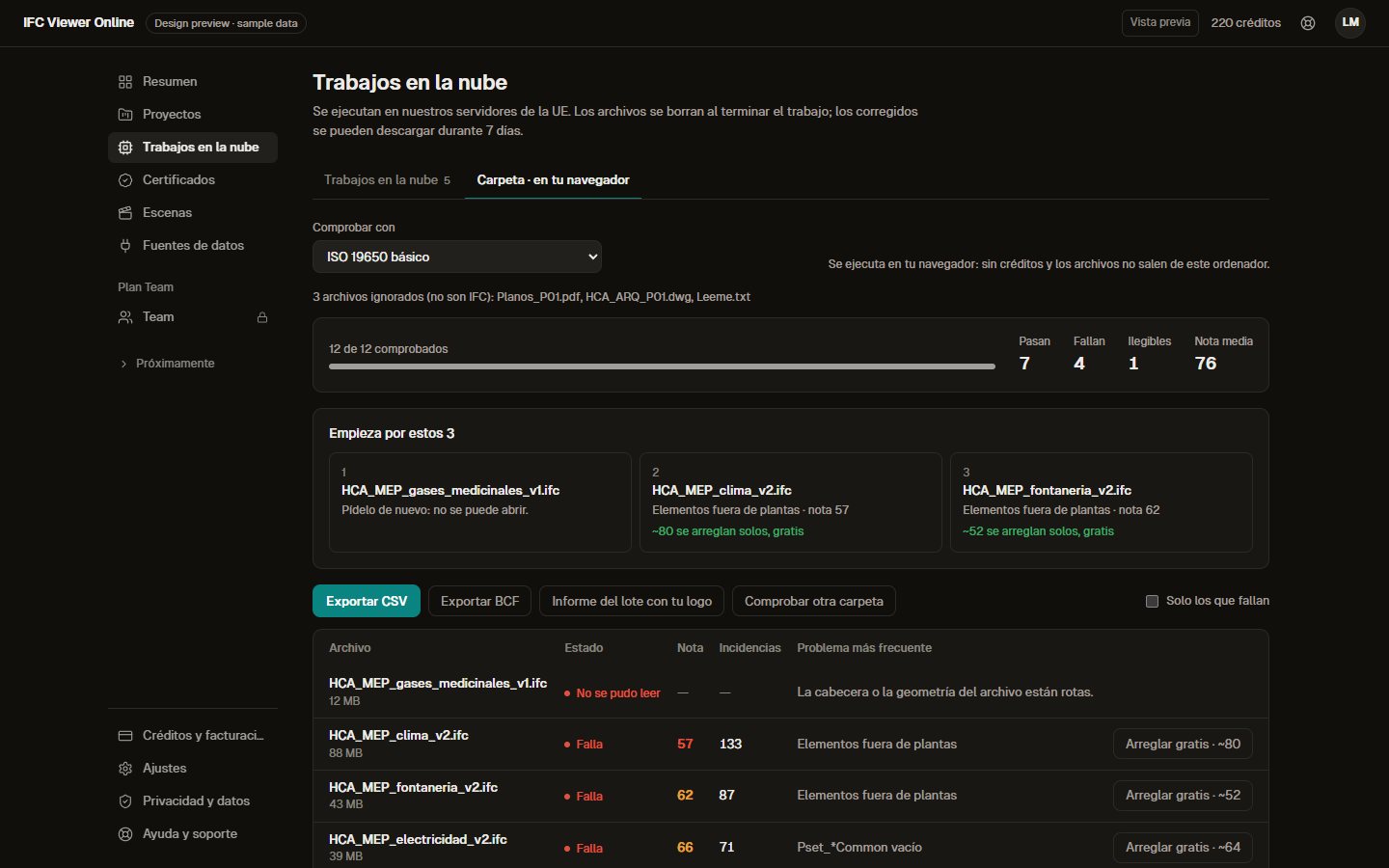 Batch of IFC files checked in the browser, sorted by severity, with the three files to start with
End of the month. You have a folder with 30 IFC files from four clients: architecture, structure, MEP, several revisions of each. Opening them one by one, waiting for each to load, reading the score, copying it into a spreadsheet and moving on takes a whole afternoon. And in the end the worst file was the ninth, the one you opened in a hurry.
How it is done today, file by file (free)
Today you open each IFC in the viewer and see its Health Score from 0 to 100, the list of failures and the automatic fixes (duplicate or empty names, GUIDs…), and you export the corrected model. All in your browser, with no account. If it is your first time, start with how to check an IFC model before delivery.
That works well for one file. For thirty, it does not.
One folder, one profile, one table (preview)
With the batch you drop a folder or a zip (up to 50 files or 2 GB in total), choose the profile to check them with (your client's standard, an IDS, the ISO 19650 naming convention) and watch the progress file by file. If you cancel, what was already checked is kept.
 Design preview with sample data, Spanish interface.
What matters is where it happens: in your browser, like the free check. The files are not uploaded to any server, so it also suits projects under NDA, and it uses no credits. To understand the difference, read validating in the browser or in the cloud.
Anything that is not IFC is skipped and listed ("3 files ignored: .dwg, .pdf"). An IFC that cannot be read is marked red without stopping the rest.
Start with these 3
A table in folder order is not a decision. The batch sorts by severity: unreadable files first, then the lowest scores. At the top a band shows the three files to start with, and each row says how many failures have an automatic fix in the free viewer.
Design preview with sample data, Spanish interface. Fixing file by file stays free; the batch only takes you there.
The "failing only" filter clears away what is already fine.
What comes out of the batch
- A CSV with one row per file: score, issues, worst rule, status. For your own records or for the invoice.
- A BCF 2.1 zip with one issue per file and rule, to open in BIMcollab, Solibri or the viewer itself.
- A batch report with your logo, as printable HTML to save as PDF, for your client or the site supervisor.
It also works on a phone, to look at the result away from the office:
 Design preview with sample data, Spanish interface.
How it compares
Tools that also check several IFC files, with prices from their official pages read on 12 November 2026. Where we could not read an official price, we do not give one. [solibri-pricing] [bimvision-plugins]
| BIMvision + plugins | Solibri | IFC Viewer Online (preview) |
|---|
| Where it runs | Windows | Windows / Mac | Browser, nothing to install |
| Are the files uploaded? | No | No | No |
| IDS checking | Paid plugin | Yes | Yes (EIR profile or IDS 1.0) |
| Sorted by severity, "where to start" | No | By rule | Yes |
| Report with your own branding | Paid plugin | Yes | Yes |
| Price | Viewer free; plugins paid (see their store) | From €1,428/year per licence (Essential) | Planned within Pro, from €39/month |
Sources: solibri.com/pricing and bimvision.eu/en/plugins, read on 12 November 2026 (the BIMvision plugins page shows no prices). Our planned prices are on the pricing page.For a general comparison of checkers, see the best IFC model checkers.
What stays free
Everything there is today: opening, checking, the Health Score, the automatic fixes and exporting the corrected IFC, file by file. The batch is a new productivity tool and it will be paid; it takes nothing away from the rest.
Do you check a lot of IFC files every month?
If every month you have a whole folder to review, join the waitlist and we will tell you when the batch opens. Meanwhile, you can check any IFC for free.
References
- Solibri pricing — Solibri. Plans and starting prices per licence per year, as published on 12 November 2026.
- BIMvision plugins — Datacomp. Lists the paid plugins; the page shows no prices. Read on 12 November 2026.
- IFC Viewer Online plans — IFC Viewer Online. Planned prices of the paid plans, which are not open yet.
How to Check 30 IFC Files at Once (and Know Which One to Start With)