IFC Viewer Online · Back to the BIM & IFC blog
Delivery & ISO 19650 · 2026-11-13 · 6 min
An IFC Upload Page for Subcontractors Who Will Never Create an Account
Subcontractors send models by email and WeTransfer because every CDE asks them for an account first. A preview of an upload page that needs only a link: the file is checked in their browser, delivered with a receipt, and the decision comes back to the same page.
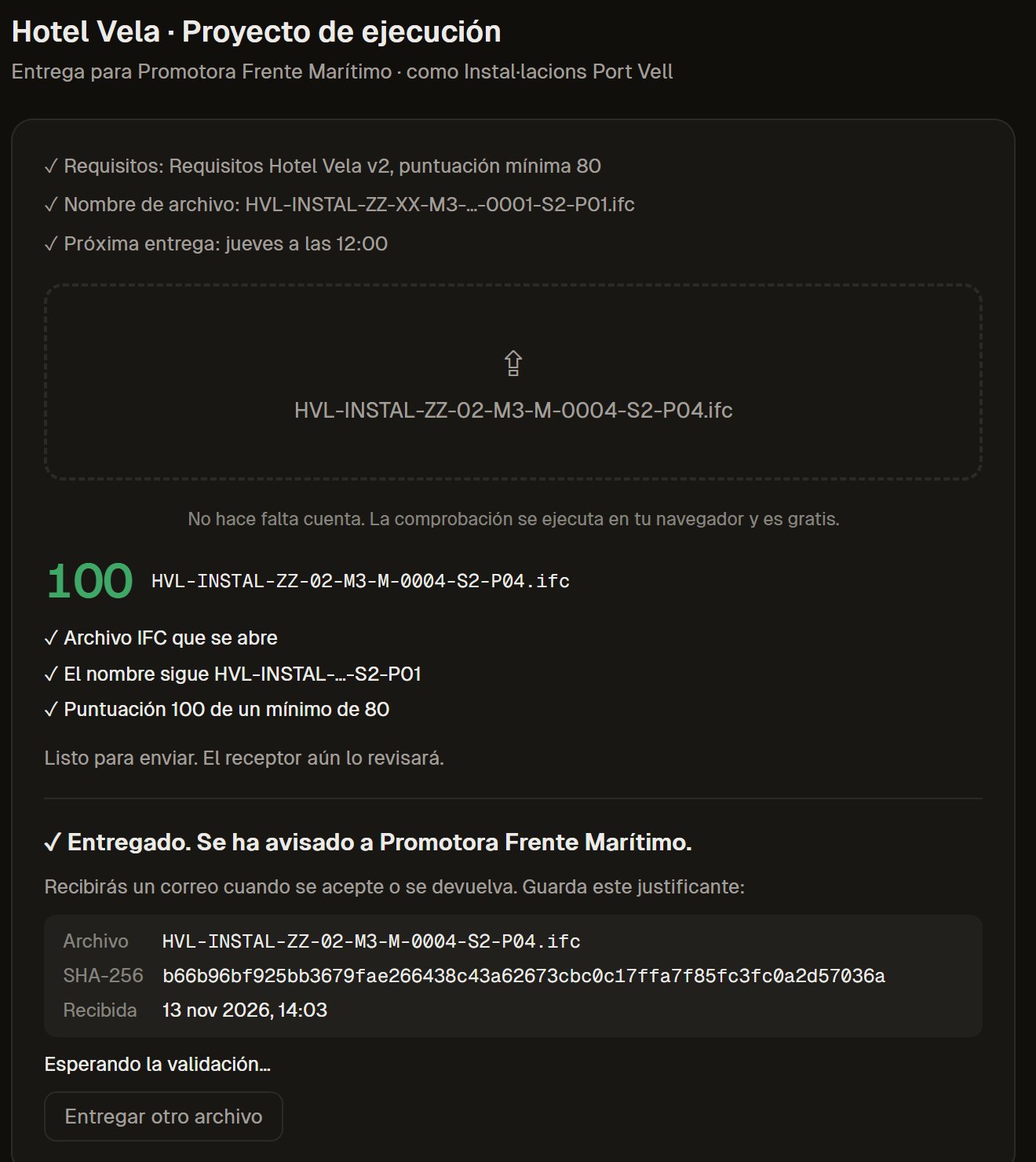 The supplier upload page after a real IFC is checked and sent: score 100, the ISO 19650 name accepted and a receipt with the SHA-256 of the file
Ask a BIM manager how models arrive from subcontractors and the answer is rarely "through the CDE". They arrive by email, by WeTransfer, on a USB stick. Not because subcontractors are careless, but because every common data environment asks them for something first: an account, an invitation, sometimes a licence.
Autodesk's own help pages describe that path: an invitee signs in with an Autodesk ID or creates one, and members from other companies are invited under "Bring Your Own Subscription", as long as they hold valid subscriptions. [autodesk-docs-signin] [autodesk-byos] For a team that delivers to one contractor twice a month, that is a lot to ask.
Key takeaways
- One link per supplier and project. No account, no licence, nothing to install.
- The file is checked in the supplier's browser before it is sent: score, rules and ISO 19650 name.
- Sending gives a receipt with the SHA-256 fingerprint of the file.
- The decision (accepted or returned, with the reason) comes back to the same page.
What the supplier sees
The page opens with three lines: the requirements and the minimum score, the file name the project expects (for example HVL-INSTAL-ZZ-XX-M3-…-S2-P01.ifc) and the next delivery date. Below, one box to drop the IFC.
In our test, the MEP subcontractor of the Hotel Vela project dropped a real IFC. The page opened it with the viewer's own engine, gave it 100 against a minimum of 80, and confirmed the name field by field. Only then did the send button appear.
Local test of the workspace on our own server with the Hotel Vela test models (real IFC files), Spanish interface. Not open yet.
If something fails, the page says what and where, before anything is sent. The supplier fixes it in their own tool and tries again. The receiving team never sees the failed attempts.
The receipt settles the argument
When the supplier presses send, the file goes straight to storage and the page shows a receipt: file name, SHA-256 and the time it was received. If the same file is sent twice, it is one delivery, not two. If a file that is not an IFC arrives (a ZIP renamed to .ifc, for example), it is returned before anyone validates it.
That fingerprint is the same one written in the contractor's delivery log, chained to the previous entry. How the receiving side reviews and decides is in how to review your subcontractors' IFC models.
The decision comes back to the same page
Under the drop box the supplier sees their own deliveries, and only theirs: waiting for validation, accepted with the score, or returned with the reason the contractor wrote. No email thread to search.
 Local test of the workspace on our own server with the Hotel Vela test models (real IFC files), Spanish interface. Not open yet.
A link only shows the project it was made for and that supplier's deliveries. We tested that on purpose; there is more on it in who sees which model in a delivery CDE.
How it compares
| A CDE with invited members | Email / file transfer | Upload page (preview) |
|---|
| Account for the supplier | Yes (Autodesk ID, subscription for external members) | No | No: one link per supplier and project |
| Checked before sending | Depends on the setup | No | Yes, in the supplier's browser |
| Proof of what was sent | Version history | The email | Receipt with SHA-256, chained in the log |
| Decision back to the supplier | Review workflows | Another email | On the same page, with the reason |
Sources: Autodesk help pages on signing in and on Bring Your Own Subscription, read on 13 November 2026. Our planned prices are on the pricing page.What it does not do yet
- The server does not yet re-check the ISO 19650 name: today that check runs in the supplier's browser.
- The invitation email is placed in a queue and not sent: sending is switched off until it opens.
- It has not been used yet by a real subcontractor outside our tests.
Try it on a project
The requirements link (rules, minimum score, ISO 19650 names) is free today: create it from the viewer and paste it into your BEP. If you want suppliers to deliver through it, with the receipt and the decision, talk to us about a pilot or read the page for contractors.
An IFC Upload Page for Subcontractors Who Will Never Create an Account