IFC Viewer Online · Back to the BIM & IFC blog
Validation · 2026-11-12 · 6 min
Checking Every IFC That Comes In Without Opening It: Watched Folder, CI and Webhooks
Thirty models a week arrive in a shared folder and nobody opens them until something breaks. A preview of checking each one as it lands, with a gate that keeps failing models from being published.
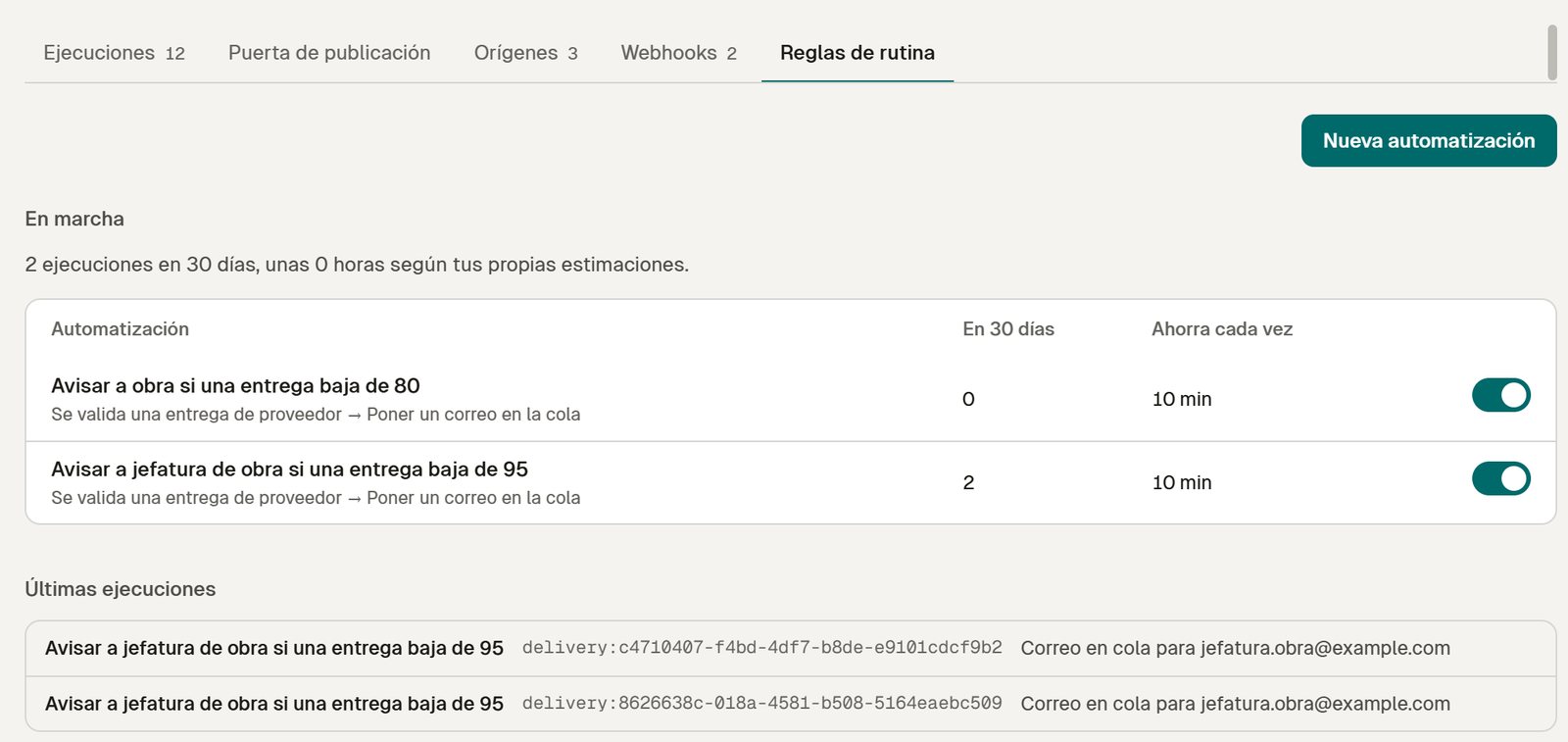 Two automations on supplier deliveries and their latest runs: each one left an email for the site manager in the mail queue
A mid-sized engineering firm receives around thirty IFC deliveries a week in a shared folder or a CDE. Checking them is somebody's job, which means it happens when that person has time. A model that fails the naming convention or is missing classifications is discovered at the coordination meeting, a week late.
If the deliveries come from outside your firm, the free requirements link already lets suppliers check before sending (see reviewing subcontractor models). This post is about the models that reach your folders anyway.
Key takeaways
- Three sources: watched folder, CI pipeline or API.
- Before switching it on, you see what would have happened to last week's deliveries.
- A failure can open an issue on its own, with the rule, the file and the camera.
- A gate keeps models below a score out of "Published", with a history of every exception.
Connect a source in three steps
A wizard asks for the source (watched folder, CI, API), the profile to check with (your house standard, ISO 19650 names, the client's IDS) and what to do if a delivery fails. At the end it shows the snippet to copy: a scheduled task for the folder, a YAML step for CI, or a curl call. Only new or changed files are sent.
 Design preview with sample data, Spanish interface. The key is not real and nothing is checked until the Team plan opens.
See the result before you switch it on
An automation set up blind tends to be switched off after its first noisy week. So the wizard runs the chosen profile on your deliveries of the last week: "of 31 deliveries, 25 would pass, 6 would fail and 5 issues would open; the most common failure: doors without FireRating."
 Design preview with sample data, Spanish interface.
Profiles are versioned: a change applies from the next delivery, and old reports keep the version they were checked with.
Every run, in one table
Each delivery shows the file, the source, the profile, the score, the result, what happened and how long it took. A failed run links to its issue. A file that could not be checked says why (in the example, 231 MB against a limit of 200 MB). On top, the week: checked, failed, issues opened by themselves, average time to the report.
 Design preview with sample data, Spanish interface.
Automations can also act on supplier deliveries. In a local test with real IFC files, a rule that watches for deliveries scoring under 95 placed an email for the site manager in the workspace mail queue each time it matched. Nothing is sent from the queue until sending is switched on.
Local test of the workspace on our own server with the Hotel Vela test models (real IFC files), Spanish interface. Not open yet.
A gate before "Published"
Checking is useful; stopping is better. The publication gate keeps a model in "Shared" while its score is below a threshold (80 in the example) or while a mandatory rule fails, and the screen tells you how many of the last versions the threshold would have stopped. A reviewer can approve an exception, and the history records who published what and who allowed which exception, with the reason.
 Design preview with sample data, Spanish interface.
Webhooks for everything else
Results go wherever your team works: a Teams or Slack channel, your own system. Webhooks send validation.completed, validation.failed and issue.created, signed with a secret, with the HTTP code of each delivery and a manual retry. After three failed attempts a webhook pauses and tells you.
 Local test of the workspace on our own server with the Hotel Vela test models (real IFC files), Spanish interface. Not open yet.
 Design preview with sample data, Spanish interface.
How it compares
Speckle Automate is the closest service. Its official pricing page, read on 12 November 2026, lists Automate only in the custom plans, with no public price; the free plan does not include it. [speckle-pricing]
| Speckle Automate | IFC Viewer Online (preview) |
|---|
| Plan | Custom plans only | Team (automations) and Developer (API) |
| Public price | No | Planned: Team from €59 per editor per month; Developer from €149/month |
| Works on IFC directly | Through Speckle's own model | Yes, with IDS 1.0 or EIR profiles |
| Preview on last week before activating | Results per run | Yes |
| Failure opens an issue with the fix | Depends on the function you write | Yes |
Source: speckle.systems/pricing, read on 12 November 2026. Our planned prices are on the pricing page.If you build your own tools, the SDK and the local MCP server are free today.
What you can already do for free
Check any IFC by hand in the viewer, with its Health Score, an IDS file or a profile, without uploading it. For a whole folder at once, see the preview of batch checking.
Would you check every delivery automatically?
Automatic checks are in preview. If your team receives models every week, join the waitlist or see how it fits an engineering firm. If you want the API for your own pipeline, talk to us. [ivo-pricing]
References
- Speckle pricing — Speckle. Automate is listed only in the custom plans, with no public price, as published on 12 November 2026.
- IFC Viewer Online plans — IFC Viewer Online. Planned prices of the paid plans, which are not open yet.
Checking Every IFC That Comes In Without Opening It: Watched Folder, CI and Webhooks