Back to the BIM & IFC blog
Tools & comparisons · 2026-11-02 · 6 min
An IFC MCP Server for Claude: Validate BIM Models and Open Them in 3D
Ask Claude whether a model is fit to deliver and get a scored answer, the failing elements and a link to see them in 3D. The checks run on your own machine.
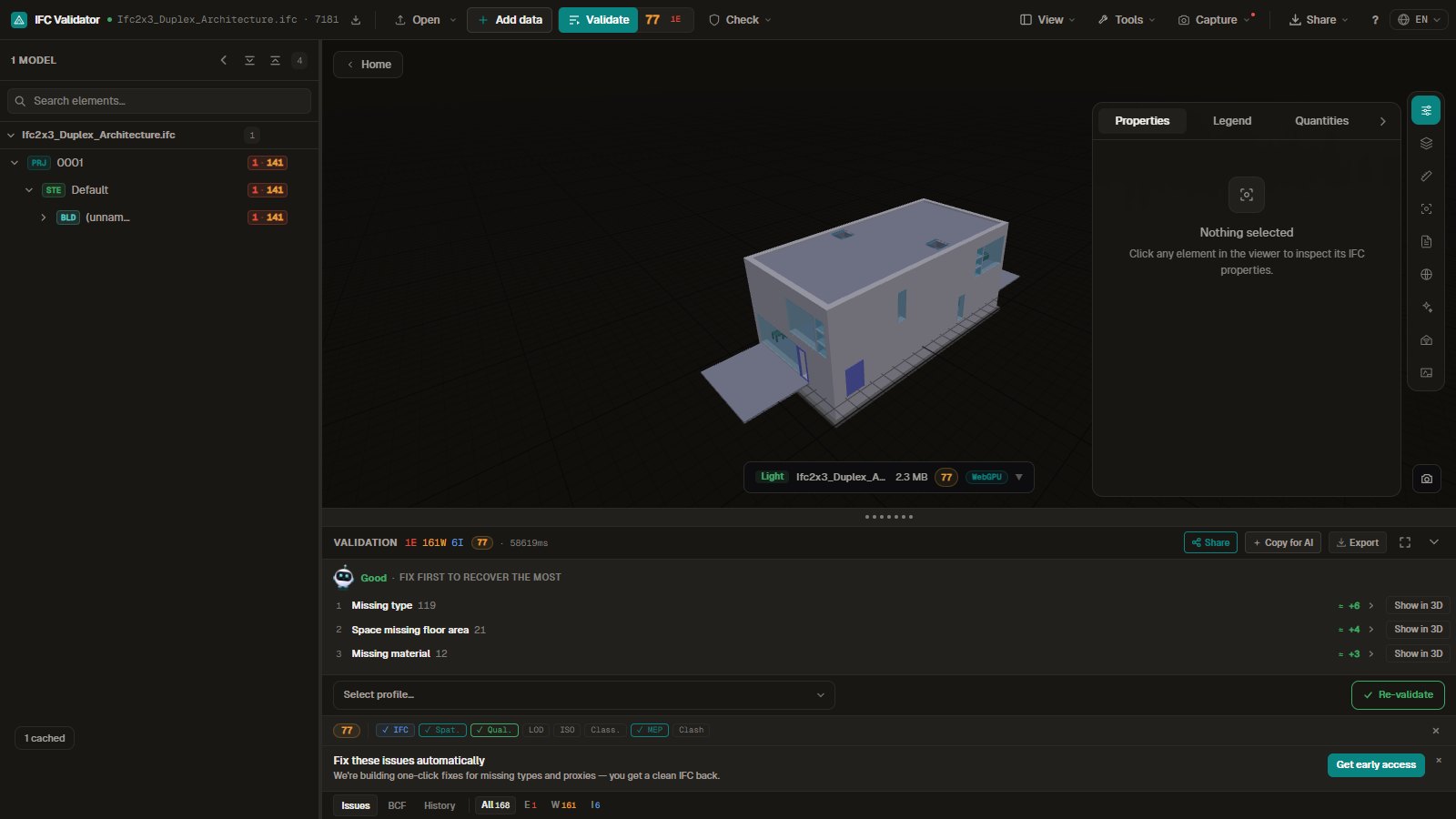 IFC building model in the browser 3D viewer with its Health Score and validation issues, opened from a link an AI assistant made
The Model Context Protocol (MCP) lets an AI assistant call tools on your computer. The IFC Viewer Online MCP server gives Claude and other assistants ten tools for BIM work: validate an IFC and score it, check it against an IDS, read a DXF, and open models, drawings, 3D sketches and live digital twins in a free browser 3D viewer.
Key takeaways
- Install with one command: npx -y ifc-viewer-mcp. Free, MIT, no account.
- Validation, IDS and DXF run on your machine; files are not uploaded.
- Same Health Score and rules as the browser viewer, with links to fix guides.
- Links open models, plans, sketches and city twins in 3D, ready to share or embed.
How do I install the IFC MCP server?
You need Node.js 20 or later. Every client starts the server with the same command, npx -y ifc-viewer-mcp, which downloads it the first time.
- Claude Code Run claude mcp add ifc-viewer -- npx -y ifc-viewer-mcp in a terminal. The tools are there in the next session.
- Claude Desktop Open Settings, then Developer, then Edit config, and add the block below to claude_desktop_config.json. Restart Claude.
- Cursor, VS Code, Windsurf, Cline Add a server with command npx and arguments -y and ifc-viewer-mcp in the client's MCP settings. The JSON is the same.
{
  "mcpServers": {
    "ifc-viewer": { "command": "npx", "args": ["-y", "ifc-viewer-mcp"] }
  }
}
What tools does it give Claude?
| Tool | What it returns | Runs |
|---|
| validate_ifc | Health Score 0–100, issue counts, costliest rules, issues with fix guides | Your machine |
| list_validation_rules | Every rule with its category, severity and standard | Your machine |
| check_ids | Pass or fail per IDS specification, with the failing elements | Your machine |
| open_in_3d_viewer | Viewer link and an iframe to embed | Browser |
| open_drawings | Model with a floor plan cut beside it | Browser |
| read_dxf | Layers, entity counts, extents, units and texts | Your machine |
| open_3d_sketch | The 3D sketch studio | Browser |
| list_digital_twins | Live city twins and the twin builder | Browser |
| read_fiware_entities | FIWARE broker entities as flat records | Your machine to the broker |
| search_port_library | Port de Barcelona IFC objects with 3D links | Your machine |
How do I validate an IFC file with Claude?
Give Claude a path or a URL and ask. validate_ifc runs the viewer's rule set — schema, spatial structure, names, GlobalIds, ISO 19650, classification, MEP — and returns the Health Score with what cost the most points.
Validate C:/projects/duplex/ARC.ifc and tell me the three things that cost the most points.
On the Duplex sample this returns a Health Score of 77 with 168 issues, led by 119 elements without a type, 21 spaces without floor area and 12 elements without a material, each with a link to its fix guide. A model with a public URL also gets a link that opens it in the viewer with the same issues.
The link from validate_ifc or open_in_3d_viewer: the same model, score and issues in the browser.
Can it check a model against IDS requirements?
Yes. check_ids takes the IFC and an .ids file (a path, a URL or the XML itself) and returns, for each specification, whether it passed, how many elements applied and which failed and why. It uses the same IDS 1.0 engine as the browser viewer; see the IDS guide.
Check model.ifc against requirements.ids and list the walls that fail, with their GlobalId.
How do I open a model in 3D from a chat?
Ask for it. open_in_3d_viewer builds a link with the options you name: several models as one federated scene, placed on the city map, seen from the top, with one IFC class isolated or a point cloud alongside. It also returns an iframe for a wiki, an intranet or a dashboard.
Open https://example.com/site/ARC.ifc and STR.ifc on the map, seen from the top, and give me an embed for our wiki.
Can it work with technical drawings?
Two ways. read_dxf tells you what a DXF holds — layers, entity counts, size in metres and the texts on it, such as room names — without opening a CAD program. open_drawings opens the model with a floor plan already cut from it, where you can drop a DXF or PDF, align it and export DXF, SVG or PDF, as described in opening DXF and PDF plans next to an IFC model.
What layers are in ground-floor.dxf, how big is it, and which rooms are labelled?
 open_drawings: the plan is cut from the model as the page opens.
Can it start a 3D sketch?
open_3d_sketch links to the sketch studio, where you draw in 3D with a pen, a finger or a mouse and export SVG, PSD, ORA or a Blender script. There is a two-pane layout for foldables. More in drawing in 3D online.
 The sketch studio that open_3d_sketch links to.
Which digital twin tools are there?
list_digital_twins returns the city twins that ship with the viewer — Barcelona, Helsinki and two in Tokyo — each with a link and an embed link, plus the twin builder for your own warehouse or import twin. read_fiware_entities reads a FIWARE context broker over NGSI-LD or NGSIv2 and returns flat records, the shape the twin panel binds to IFC elements. search_port_library finds objects in the Port de Barcelona IFC library, such as cranes and bollards, with a link to see each in 3D.
Show me a live digital twin of Barcelona, then find a crane in the Port de Barcelona library and open it in 3D.
 The Barcelona scene from list_digital_twins, with live bikes, chargers, traffic and air quality.
 A crane from search_port_library (Port de Barcelona, CC BY 4.0).
What does it not do?
- It does not edit or fix IFC files; it reports and links to fix guides.
- It does not upload anything or keep a history; every call starts fresh.
- It cannot open a local file in the browser viewer; that needs a public URL or a drag and drop.
- DWG is detected but not read; save it as DXF first.
An IFC MCP Server for Claude: Validate BIM Models and Open Them in 3D