IFC Viewer Online · Back to the BIM & IFC blog
Validation · 2026-11-12 · 7 min
Writing Your Own BIM Checking Rules, and Testing Them Before You Publish Them
A bad rule blocks every supplier who checks against it. A preview of a rule editor where you write the rule as a sentence, watch which elements fail while you type, and run test cases before anyone else sees it.
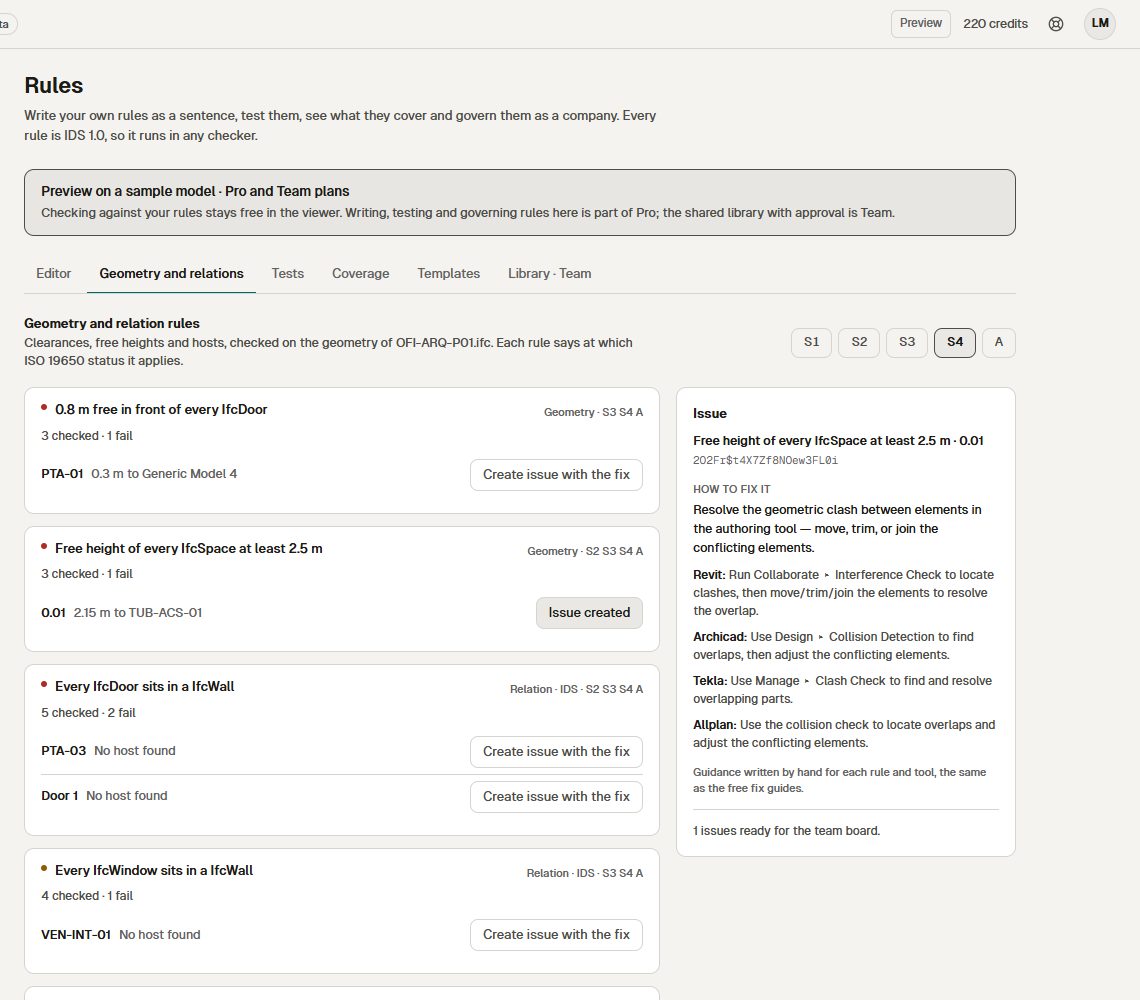 Geometry and relation rules checked on a sample model, with the fix for each failure in Revit, Archicad, Tekla and Allplan
Every BIM manager has a list of things they check by hand: external walls must carry a fire rating from the allowed list, every door sits in a wall, the classification code is filled in. Turning that list into automatic rules is usually where things stall. Rule formats are hard to read, and nobody knows whether a rule is right until it rejects a model it should have accepted.
A wrong rule is not a small thing. Once suppliers check against it, a rule that fails good elements blocks all of them, and you find out from the phone calls.
Key takeaways
- A rule is one sentence: for each element of a class, where a condition holds, this must be true, with this severity.
- While you write it, you see which elements pass and which fail, by name and GlobalId.
- Test cases say which elements must pass or fail; a rule is only published when they all match.
- Data and relation rules are written out as IDS 1.0, so they work in any checker.
A rule is a sentence
The editor builds the rule as you would say it: "For each IfcWall, only where IsExternal is true, Pset_WallCommon.FireRating must be one of EI60, EI90, EI120. If it fails: error." Three steps (which elements, what they must have, what happens if they fail), and next to them a live preview on the model: how many elements were checked, how many pass, how many fail, with their names and GlobalIds.
 Design preview with sample data, Spanish interface. The IDS text below the preview is the same rule in the open standard.
Underneath, the same rule appears as IDS 1.0 XML, ready to download. If you have not used IDS before, read our guide to IDS first: this post is about writing and testing rules, not about the format. [bsi-ids]
Test the rule before it reaches anyone
Programmers write tests before they ship code. Rules deserve the same. In the Tests tab you pick sample elements and say what should happen to each: this wall must pass, this one must fail, this table does not apply. One click runs them all with the real engine. Green means the rule does what you meant; red means it would have rejected the wrong thing.
 Local test of the workspace on our own server with the Hotel Vela test models (real IFC files), Spanish interface. Not open yet.
We have not found another checker that lets you test a rule against expected results before publishing it. It is cheap to do and it is what keeps one bad rule from stopping ten suppliers.
What no rule checks
Results tell you what failed. They do not tell you what was never checked. The coverage matrix crosses IFC classes with rules: on the architecture model of Hotel Vela (1,470 elements), the ISO 19650 basics ruleset checks 36% of the elements, and curtain walls, roofs, stairs and slabs are checked by none.
 Local test of the workspace on our own server with the Hotel Vela test models (real IFC files), Spanish interface. Not open yet.
It is the quickest way to see that a ruleset written for architecture says nothing about MEP.
Rules about relations and geometry
Data rules are half of the job. The other half are questions like "is every door hosted in a wall?" or "does every space belong to a zone?". These are relation rules, and IDS 1.0 can express them (partOf), so they travel in the standard as well.
Then come geometric rules: 0.8 m of free space in front of every door, a clear height of at least 2.5 m in every space. They use the geometry core of clash detection. An honest limit: in the preview they run on sample geometry (boxes). For measuring clearances by hand on a real model today, see how to check clearances in an IFC model.
Design preview with sample data, English interface. Each failure becomes an issue that carries how to fix it in Revit, Archicad, Tekla and Allplan.
A failure can become an issue in one click, and the issue carries the fix for each authoring tool: the same hand-written guidance as the free fix guides, not generated text.
Not every rule applies at every stage
At S2 you do not ask for what you ask at S4. Instead of keeping one ruleset per stage, each rule says at which ISO 19650 status it applies, and the stage selector shows which ones count now.
 Design preview with sample data, Spanish interface.
How it compares
Solibri is the reference for rule-based checking. Prices from its official page, read on 12 November 2026. [solibri-pricing]
| Solibri | Free IDS editor (viewer) | IFC Viewer Online rules (preview) |
|---|
| How rules are written | Parameters of rule templates | Form per requirement | A sentence, with a live preview of failing elements |
| Test cases before publishing | No | No | Yes |
| Coverage by IFC class | No | No | Yes |
| Geometric rules | Yes, many | No | Door clearance and clear height (sample geometry for now) |
| Open format of the rules | Own format | IDS 1.0 | IDS 1.0 for data and relation rules |
| Price | From €1,428/year (Essential), €2,109/year (Advanced), per licence | Free | Planned within Pro, from €39/month |
Source: solibri.com/pricing, read on 12 November 2026. Solibri has far more geometric rules than we do; that is its strength. Our planned prices are on the pricing page.For the wider comparison, see the Solibri alternative page. When rules are shared by a whole company, someone has to approve them: that is the subject of the post on the company rule library.
What you can already do for free
Check any IFC against an IDS file or one of the built-in profiles, edit EIR profiles in the viewer, import and export IDS 1.0. All in your browser, with no upload. None of that changes.
Do you write the rules others check against?
The rule editor is in preview. If you maintain checking rules for your firm or your clients, join the waitlist and we will write when it opens.
Writing Your Own BIM Checking Rules, and Testing Them Before You Publish Them