IFC Viewer Online · Back to the BIM & IFC blog
Delivery & ISO 19650 · 2026-11-12 · 6 min
A Weekly Update to the Client With Data From the Model, Not Photos
Clients do not open IFC files, but they do read a short email. A preview of a weekly update filled with the numbers of the model itself, with a project page the client opens without an account and replies that come back as a thread.
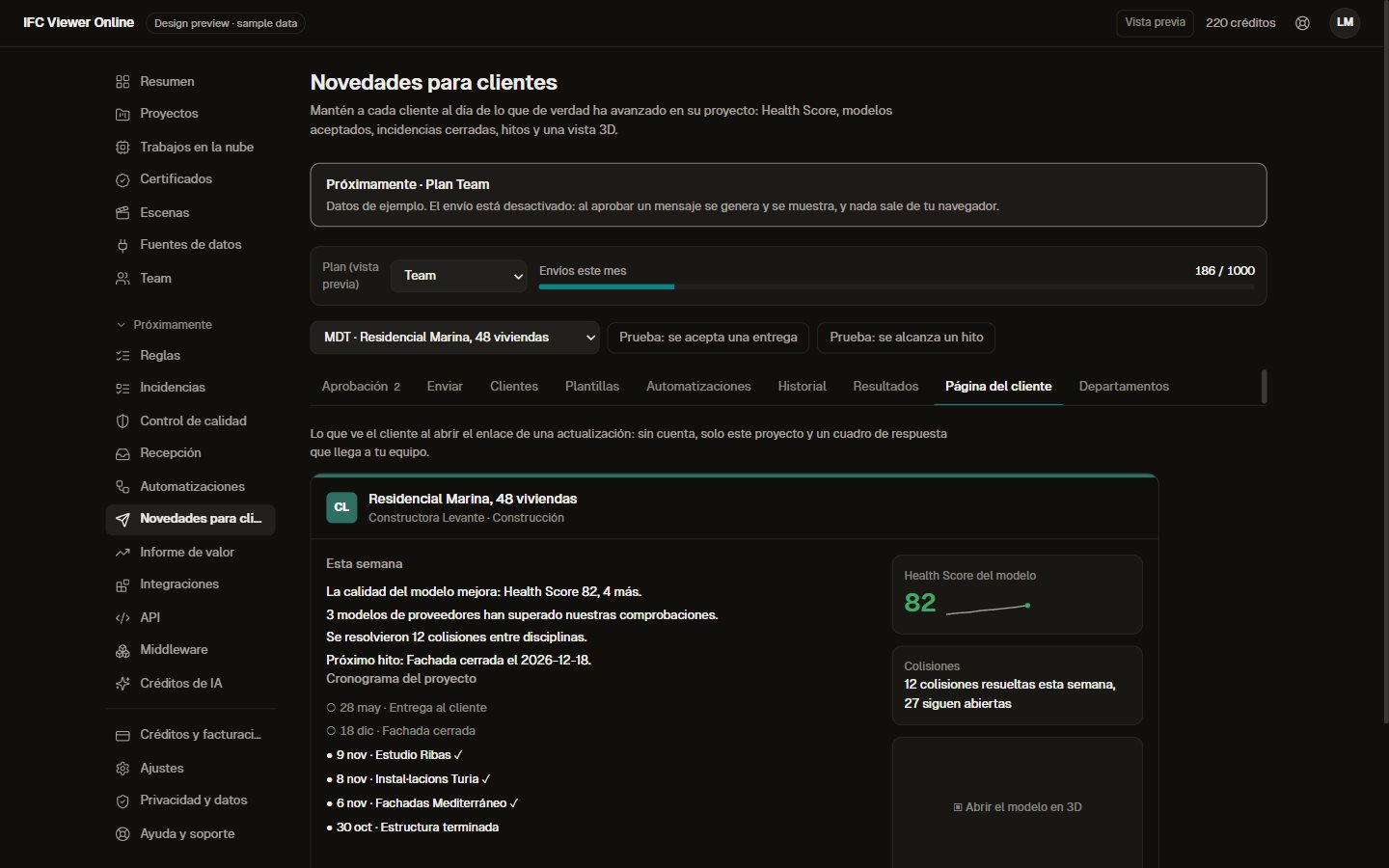 Project page the client opens from the weekly update: summary, timeline and Health Score
Every Friday someone on the project writes to the developer: how the week went, what is late, what is next. It takes an hour, it is written from memory, and it usually ends with a photo of the site. Meanwhile the model holds exact numbers on quality, deliveries and clashes that never reach the client.
Key takeaways
- Fixed sentences filled with the project's numbers: quality, accepted deliveries, clashes resolved, next milestone.
- A project page the client opens without an account, with the 3D view.
- Replies come back to the team as a thread, or become an issue.
- Consent, one-click unsubscribe and no tracking pixel.
Start from a phase, not from a blank page
Templates follow the project: start of project, delivery accepted, milestone reached, delivery. Each one already carries live blocks: the Health Score with its trend, accepted deliveries, closed issues, milestones, a 3D capture. You choose who receives it (developer, investors, technical team), only among people who have accepted.
 Design preview with sample data, Spanish interface. Sending is switched off.
You can test two subject lines. The split is stable and no one is tracked individually; a winner is only declared with enough clicks on both sides, and is used for the rest of the series.
Numbers the client understands
The summary is three or four sentences anyone can read: model quality, deliveries accepted this week, "12 clashes resolved this week", the next milestone. They are fixed sentences filled with numbers; nothing is invented.
 Design preview with sample data, Spanish interface.
The clash numbers come from the trend of clash detection, and the accepted deliveries from the receiving side. The more of the project runs through them, the more the update says.
A page for the client, without an account
The link in the email leads to a page for that project: the summary, a timeline of milestones and accepted deliveries, the Health Score, the clashes, the 3D model in the browser, and a box to write to the team. It works on a phone.
Design preview with sample data, Spanish interface.
 Design preview with sample data, Spanish interface.
Replies come back as a thread
"When will the façade samples arrive on site?" The client's reply comes back to the team as a thread, the team answers from its department, and if the message is a problem rather than a question, it can become an issue in one click.
 Design preview with sample data, Spanish interface.
Consent, unsubscribe and no tracking pixel
Updates only go to contacts who gave their consent, and consent is checked again at the moment of sending. Every email has one-click unsubscribe. There is no tracking pixel: we do not count opens, only clicks on the project link, per message and never per person.
Without your own domain, updates go out from our address with your department's name and replies go to you. On the Reception plan they can come from your own domain, with a wizard for the SPF, DKIM and DMARC records.
 Design preview with sample data, Spanish interface. The DNS check uses a sample answer.
How it compares
Email tools know nothing about the project. Construction client portals report with photos and daily logs; Buildertrend, for example, describes a portal with the schedule, daily logs and photos. [buildertrend-portal] We have not found one that reports with numbers measured on the BIM model.
| Email marketing tool | Construction client portal | IFC Viewer Online (preview) |
|---|
| What the update says | What you write | Photos, schedule, daily logs | Numbers from the model: quality, deliveries, clashes, milestones |
| Client needs an account | No | Usually yes | No |
| Open tracking | Usually, with a pixel | Varies | No pixel; only clicks, per message |
| Reply becomes an issue | No | No | Yes |
Source for the portal description: buildertrend.com, read on 11 November 2026. The other columns describe categories, not one product.What is planned in each plan
| Plan | Client updates (planned) |
|---|
| Free | Sharing a link to the model in the viewer, as today |
| Pro | Up to 200 emails a month, sent by hand with templates |
| Team | Up to 1,000 a month, with automations, segments and subject tests |
| Reception | Up to 3,000 a month, "delivery accepted" to the developer, your own domain |
Planned limits. The prices of each plan are on the pricing page.Do you report to a client every week?
The client update is in preview. Join the waitlist, or, if you are a contractor receiving models from several suppliers, see how it fits. [ivo-pricing]
A Weekly Update to the Client With Data From the Model, Not Photos