IFC Viewer Online · Back to the BIM & IFC blog
Tools & comparisons · 2026-11-12 · 6 min
Shared BCF Issues for Small Teams: What You Need and What It Costs
A team of six does not need an enterprise issue tracker. It needs one list everyone sees, with the camera saved in each issue, and clients who can comment without a seat. A preview, and what the alternatives cost.
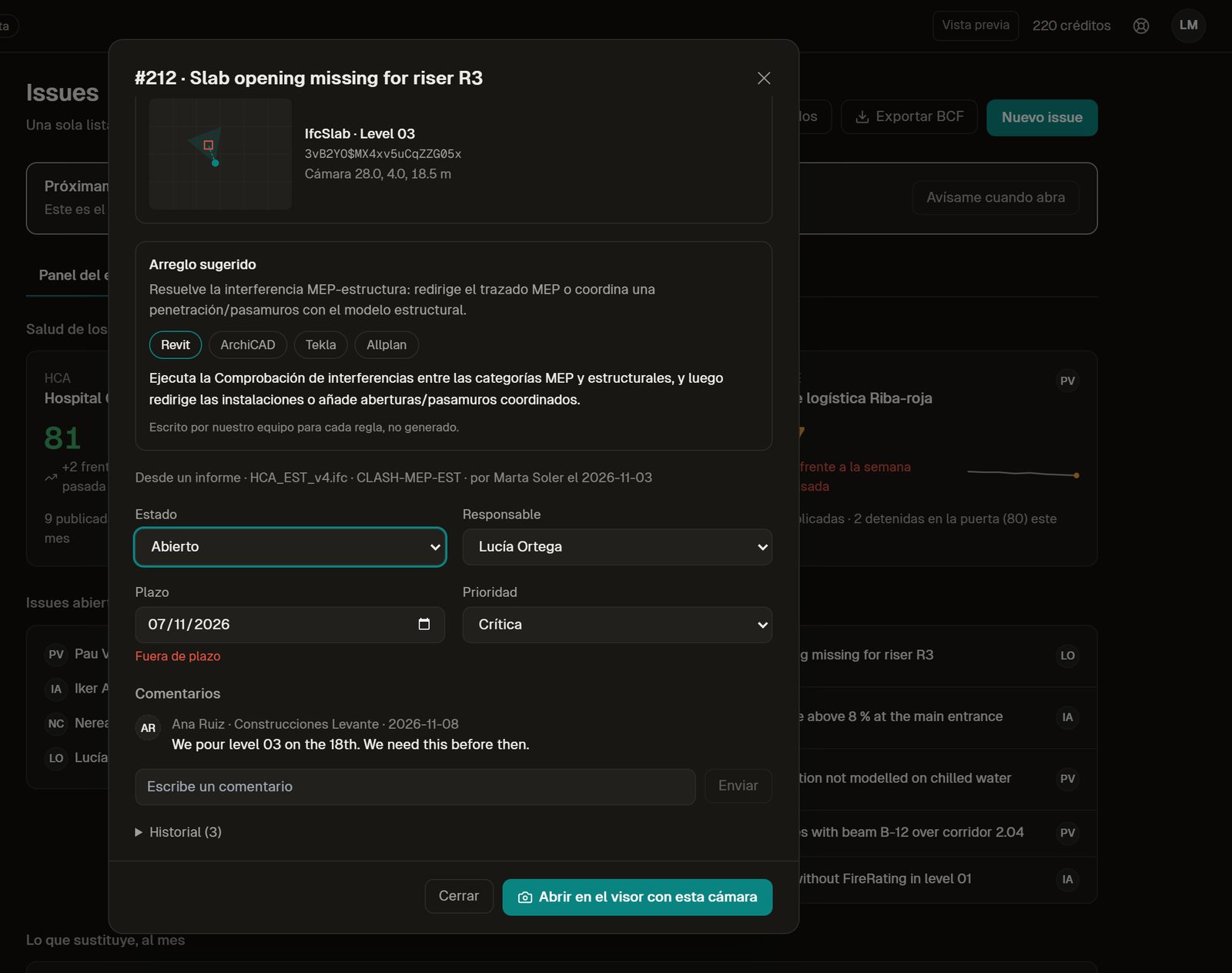 A shared BCF issue with the saved camera, the suggested fix for each authoring tool, state, assignee and due date
In a small engineering firm, the issues of a project usually live in three places: BCF files sent by email, a spreadsheet someone keeps up to date, and the memory of whoever was at the meeting. Each BCF file is a snapshot. Nobody knows which one is the latest, and the client asks by email about something that was closed last week.
Key takeaways
- One list for the team, with open, mine, overdue and closed.
- Each issue keeps its camera: everyone opens the model at the same view.
- The issue says how to fix the problem in Revit, Archicad, Tekla or Allplan.
- Clients and contractors join free, without a seat.
One list, the same for everyone
The list has tabs for open, assigned to me, overdue and done, with counts. Each row shows where the issue came from (the viewer, a check report, an automation, an imported BCF), its state, who has it and when it is due, in red if it is late. You can search by title, model or number and filter by discipline.
 Design preview with sample data, Spanish interface. The sample issue titles are in English.
The camera is part of the issue
An issue without a view is a sentence. Created from the viewer, the issue arrives with its title, the element (GlobalId) and the camera already filled in. "Open in the viewer with this camera" takes anyone on the team to the same view.
 Design preview with sample data, Spanish interface.
An issue can also start from a clash. In this test on the Hotel Vela models, a curtain wall crosses a slab by 339 mm; one click creates the issue with both GlobalIds, and the same clash never opens two issues.
 Local test of the workspace on our own server with the Hotel Vela test models (real IFC files), Spanish interface. Not open yet.
How BCF stores that camera differs between versions 2.1 and 3.0; if it matters for your tools, read BCF 2.1 vs 3.0 viewpoints.
The issue says how to fix it
This is the part other trackers leave out. When an issue comes from a failed check, it carries the suggested fix for each authoring tool: what to do in Revit, Archicad, Tekla or Allplan. It is guidance written by our team for each rule, the same as in the free fix guides, not generated text.
Design preview with sample data, Spanish interface.
Clients and contractors join free
Clients and contractors are invited by email. They see the issues you share, comment, and change the state of the ones assigned to them. They do not take a seat, and before inviting them you see what they will see.
 Design preview with sample data, Spanish interface.
How the team is doing
The first screen is not the list but the team: the Health Score of each project with its trend, open issues per person and the deadlines at risk.
 Design preview with sample data, Spanish interface.
What it costs
BIMcollab is the best-known shared BCF platform. Prices from its official page, read on 12 November 2026. [bimcollab-pricing] [ivo-pricing]
| BIMcollab Platform | IFC Viewer Online Team (preview) |
|---|
| Price per person | Basic €12.50, Advanced €18.75, Enterprise €25 per user per month, billed yearly (€19, €29, €39 billed monthly) | €59 per editor per month, billed yearly (minimum 3 editors) |
| Guests (client, contractor) | See their plans | Free, no seat |
| Suggested fix per authoring tool | No | Yes |
| BCF 2.1 / 3.0 | Yes | Yes, import and export |
| What else is included | Issue platform; Zoom and Nexus per plan | Clash detection, rules, automations and the client update |
Source: bimcollab.com/pricing, read on 12 November 2026; the page states no minimum number of users. Per seat, BIMcollab is cheaper for issues alone; Team includes more than issues. Our planned prices are on the pricing page.If issues are all you need, a dedicated issue platform costs less per person. Team makes sense when the same team also coordinates clashes (see clash detection in the browser) and checks deliveries automatically.
What you can already do for free
Open several IFC models together, create BCF issues from the viewer and export or import BCF 2.1 and 3.0. Free, in your browser. Open the viewer.
Does your team share issues by email today?
Shared issues are in preview. Join the waitlist, or see how the Team plan fits an engineering firm.
References
- BIMcollab pricing — BIMcollab. Platform plans per user per month, as published on 12 November 2026. The page states no minimum number of users.
- IFC Viewer Online plans — IFC Viewer Online. Planned prices of the paid plans, which are not open yet.
Shared BCF Issues for Small Teams: What You Need and What It Costs