Back to the BIM & IFC blog
Digital twins · 2026-10-10 · 8 min
BIM vs Digital Twin: The Same Model, Three Steps Apart
BIM and digital twins get talked about as if they were the same thing. They are not, and the difference is easiest to see on one set of models: as BIM files, placed in their city, and connected to live data. What each step adds, what a twin needs from BIM, and when you do not need a twin at all.
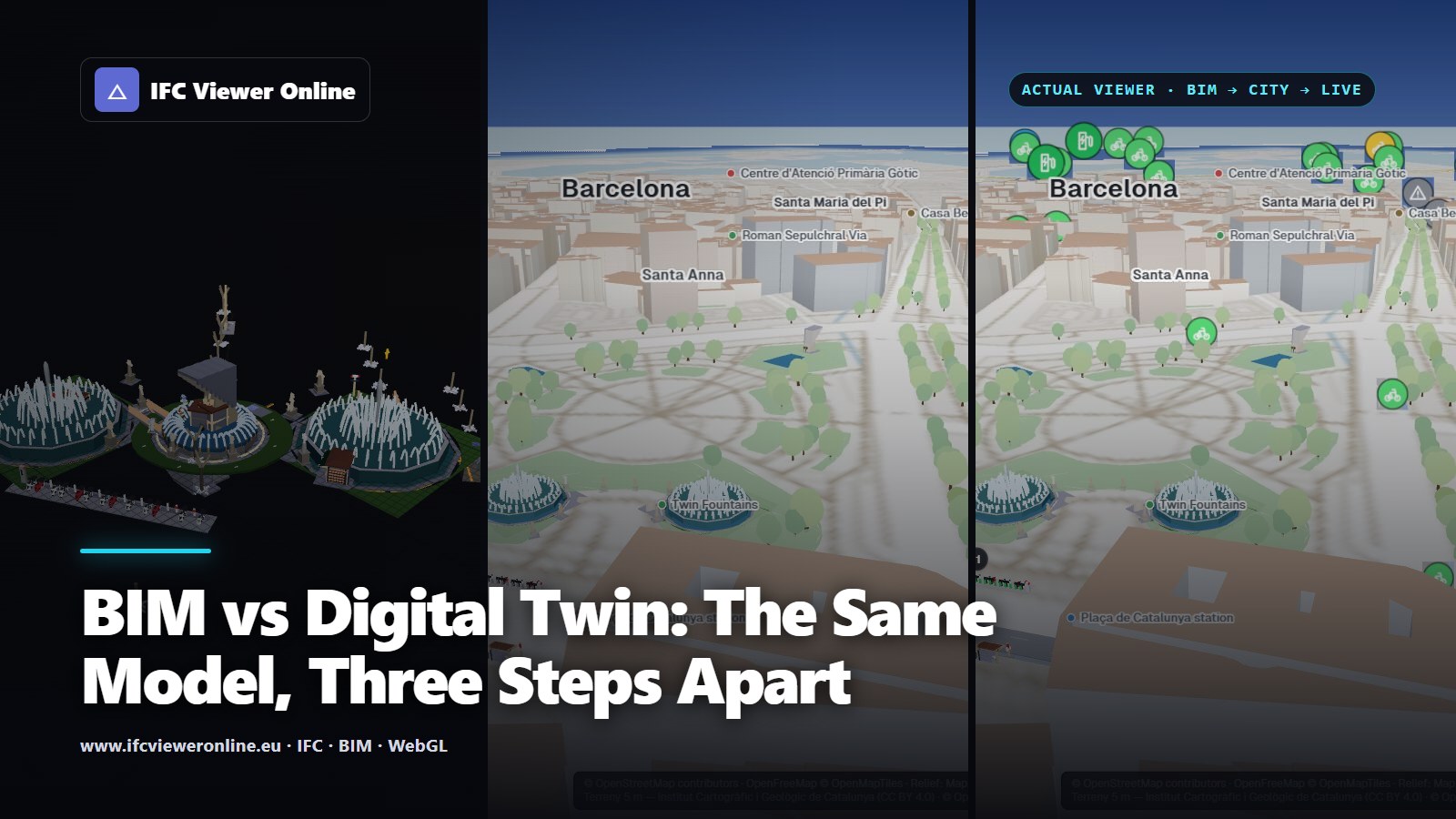 The same IFC models of Plaça de Catalunya three times in IFC Viewer Online: alone as BIM, placed on the 3D map of Barcelona, and coloured by live open data as a digital twin
BIM is a model of what was designed and built, with its data. A digital twin is a model connected to the thing it models, so it also knows what state that thing is in now. Every twin of a building or an asset needs something like BIM underneath; most BIM models will never be twins, and do not need to be.
The difference is easiest to see on one set of models. Below, the same eight IFC files of Plaça de Catalunya in Barcelona go through three steps: as BIM files, placed in their city, and connected to live data.
Key takeaways
- BIM answers "what is this and how was it designed?". A twin also answers "what is it doing now?".
- Between the two sits a step people skip: placing the model where it really is, on real terrain, with its surroundings.
- What a twin needs from BIM is what lets it find each asset: a stable identity (GlobalId), type, classification and location. Detailed geometry is the least of it.
- If nobody will act on the live state, you do not need a twin: a good BIM model and a proper handover are enough.
 What each step adds to the same models. Only the last one knows what is happening now.
Step 1: the BIM model
 The eight IFC files on their own: rich in data, but nothing says what is around them or what is happening.
An IFC model carries a lot: the geometry of each element, its type, its properties and quantities, how elements group into systems and assemblies, and the classification codes owners use. The Bicing station here knows it has 21 dock posts, what they are and which assembly they belong to.
What it does not know is where it is in the world, unless someone put a georeference in the file, or what state any of it is in. For design and coordination that is fine: it is what the model is for. How a model is organised is explained in IFC spatial structure.
Step 2: the model in its city
 Placed by their georeference on the real terrain, with the city around them. Still a snapshot.
Placing the models by their georeference — an IfcMapConversion to a real coordinate system — puts them on the real terrain, with the streets and buildings around them. Now you can see what the model alone could not: how a fountain sits against the kerb, where the bike station is relative to the metro entrance. The technique is in how to view an IFC on a 3D map, and what goes wrong in IFC coordinates and georeferencing.
It is still a snapshot. Nothing on screen changes unless someone edits a file.
Step 3: the twin
Try it: the same models, connected
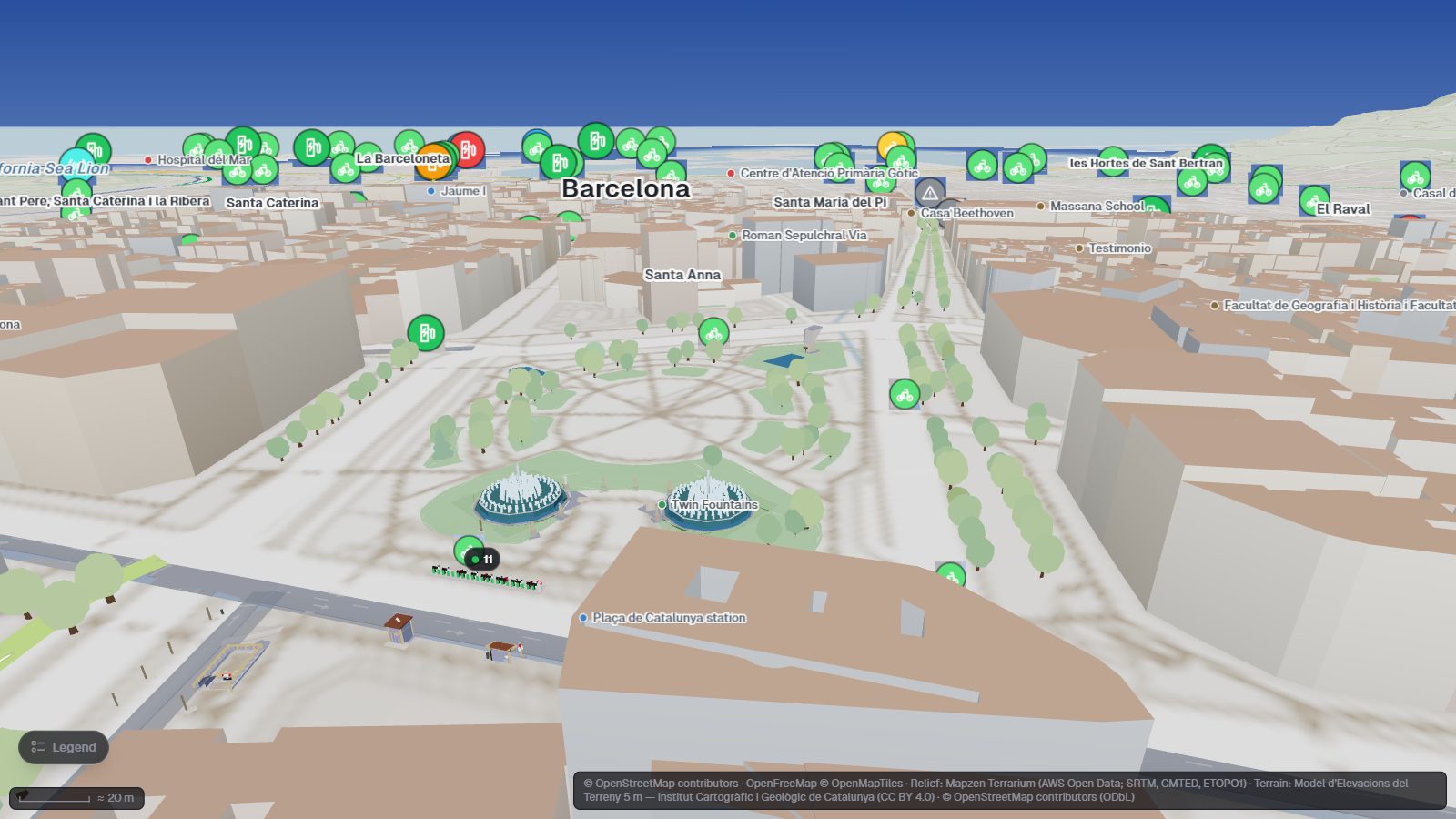
The eight models with Barcelona's live feeds. The Bicing docks and the charger bays take their colour from the data, with the live value floating above them.
Open the interactive IFC viewer
The last step connects the model to the place. A device source polls a feed; a binding says which elements a device drives and how. Bicing station 65 drives the 21 dock posts: red when there are no bikes, grey when the feed has gone quiet. The model now shows what is happening, not only what was built.
That is the whole difference, and it is what the Digital Twin Consortium's definition turns on: a representation kept in sync "at a specified frequency and fidelity"[dtc]. How this one was built is in a live digital twin of Plaça de Catalunya.
What a twin needs from BIM
| The twin needs | Where it is in IFC | What breaks without it |
|---|
| A stable identity for each asset | GlobalId | Bindings point at elements that no longer exist after the next export |
| What kind of thing it is | IFC class and type object (IfcTypeObject) | Rules cannot target "all dock posts" or "all pumps" |
| A code the owner uses | IfcClassificationReference (Uniclass, OmniClass…) | The twin cannot talk to the maintenance system |
| Where it is | IfcSite with IfcMapConversion | The model drifts away from its street and from the data |
| Maintenance data | Property sets, or COBie at handover | An alarm on an asset nobody can identify |
The first row is the one that breaks most often in practice. Some tools regenerate GlobalIds on every export, so a twin bound by id loses its assets at the next update: why IFC GUIDs change on every export. The handover side is covered in COBie from IFC and IFC handover documentation.
What a twin adds to BIM
- Current state: a value for each asset, refreshed at a known rate.
- Freshness: how old each reading is, so stale data cannot pass for "all is well".
- Rules and alerts: colours and warnings when a value crosses a threshold for long enough.
- History: what the readings were, so you can replay what happened.
When you do not need a twin
A twin costs more than a model: someone has to keep the feeds running, the bindings matched to the model after every revision, and the alerts answered. It pays off when people will act on the live state — operations, maintenance, mobility. For design coordination, clash detection or a one-off handover, a well-structured BIM model is the right tool, and a twin would be decoration.
Mistakes that make a twin fail
- Calling a 3D viewer a twin. Without live state there is nothing to keep in sync.
- No georeference. The model lands in the wrong place and nothing lines up with the data.
- Identity that changes between exports. Every binding has to be redone.
- Old data shown as current. A reading with no freshness rule looks the same at 2 seconds old and at 2 days old.
BIM vs Digital Twin: The Same Model, Three Steps Apart