Back to the BIM & IFC blog
Delivery & ISO 19650 · 2026-10-03 · 9 min
ISO 19650 File Naming Convention Explained (With Examples)
Seven fields and six hyphens decide whether a model can be found, sorted, checked and federated without anybody opening it. What each field means, the role codes, where status and revision belong instead — and the naming mistakes that quietly break a CDE.
 ISO 19650 File Naming Convention Explained (With Examples) — IFC Viewer Online article cover
Every project has a folder of files called things like "Model_final_v3_JB_NEW.ifc". And every project eventually discovers why that is expensive: nobody can tell which discipline it belongs to, which zone or level it covers, whether it is the current version, or whether the file someone emailed yesterday is the same one in the CDE.
ISO 19650 answers this with a naming convention that turns the file name into data. Once you can read one, you can read all of them — and so can every tool on the project.
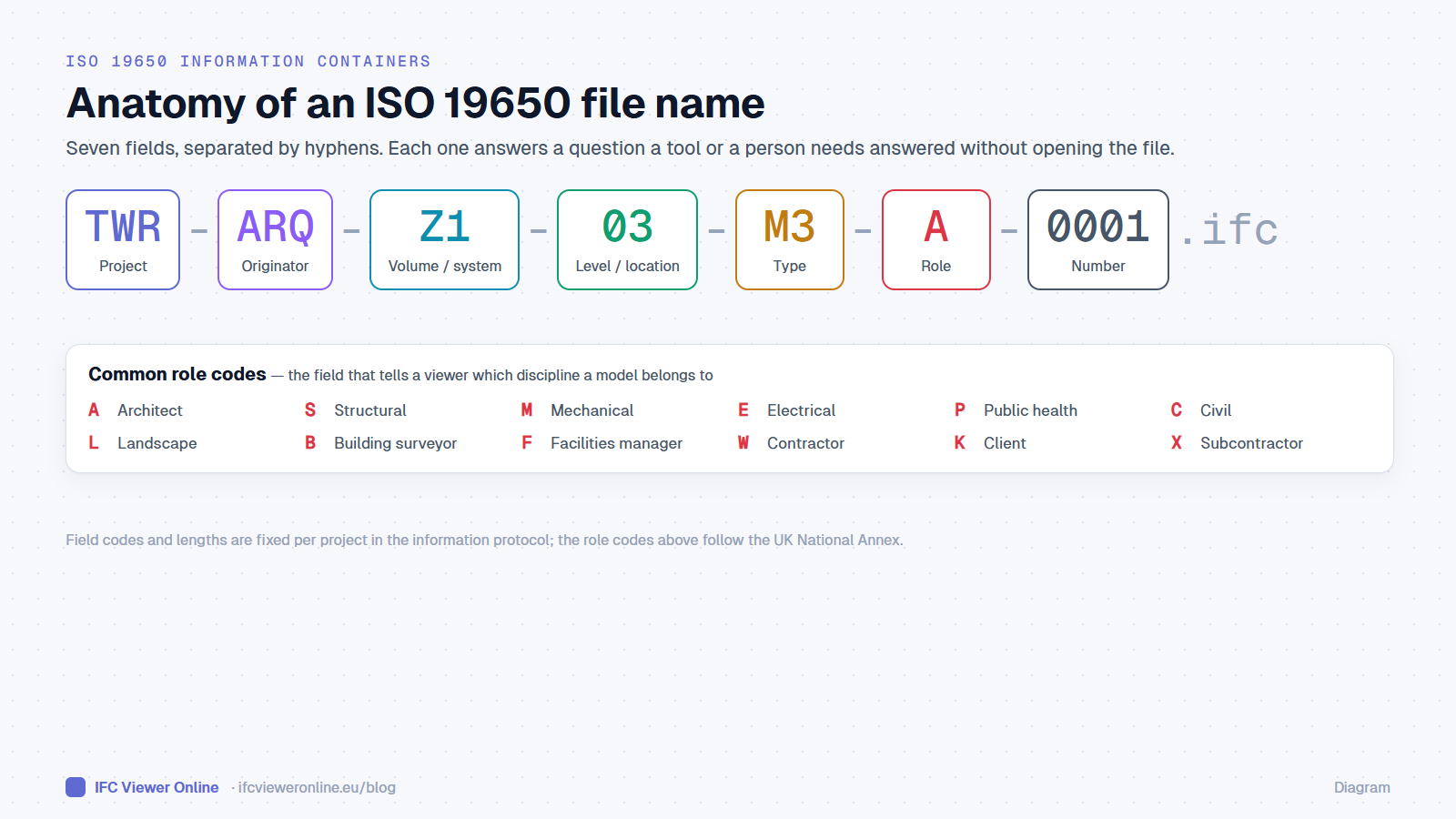 An ISO 19650 file name has seven fields. The role field is the one that tells tools which discipline a model belongs to.
Try it: a federated set named by ISO 19650
Three files named BCN-IVO-ZZ-XX-M3-A-0001, -S-0001 and -M-0001: architecture, structure and MEP. The role letter is all the viewer needs to tell the disciplines apart.
Open the interactive IFC viewer
Key takeaways
- A file name is seven fields separated by hyphens: project, originator, volume/system, level/location, type, role, number.
- The allowed codes are agreed per project in the information protocol — the standard defines the structure, the project defines the vocabulary.
- Status and revision are metadata in the CDE, never part of the file name.
The seven fields, one by one
| Field | Example | Answers |
|---|
| Project | TWR | Which project is this? |
| Originator | ARQ | Which organisation produced it? |
| Volume / system | Z1 | Which zone, building or system does it cover? |
| Level / location | 03 | Which floor or location? (ZZ for multiple, XX for none) |
| Type | M3 | What kind of container? M3 = 3D model, DR = drawing, SP = specification… |
| Role | A | Which discipline? A = architect, S = structural, M = mechanical… |
| Number | 0001 | Which one of several with the same fields? |
Field lengths, separators and the code lists are fixed for each project in its information protocol.Status and revision: not in the name
The most common mistake is adding the suitability or the revision to the name — TWR-ARQ-Z1-03-M3-A-0001-S2-P03.ifc. It looks thorough. It means every issue of the same container has a different name, every link and reference to the previous issue breaks, and the CDE can no longer show the history of one container.
| Metadata | Codes (UK National Annex) | Where it lives |
|---|
| Suitability | S0 work in progress · S1 coordination · S2 information · S3 review and comment · S4 stage approval · A1… authorised | CDE metadata |
| Revision | P01, P02… preliminary · C01, C02… contractual | CDE metadata |
| Classification | Uniclass, OmniClass, CCI… | Metadata and inside the model |
Why naming matters to tools, not just to people
A good name is data a machine can read without opening the file. That matters more every year, as more of the checking and federating is done by software:
- Federation: a viewer can group models by role and colour them by discipline — architecture translucent, structure in one colour, MEP in another — from the name alone.
- Delivery checks: the file name is the first row of most acceptance tables, because a misnamed container cannot be found, sorted or traced.
- Revision tracking: when the same name always means the same container, comparing this week's drop with last week's is a matter of matching names, then GlobalIds.
In our viewer, the role field is what drives the discipline colours in coordination images — see presentation images from an IFC. The acceptance side is in IFC acceptance criteria.
Five naming mistakes that cost real time
- Status or revision in the name — every issue becomes a new file.
- Free-text fields — "Arch" in one file, "ARC" in the next, "A" in a third. Agree a code list and nothing else.
- Different level codes per discipline — 03 for the architect, L3 for the engineer. Federation by level stops working.
- Spaces and special characters — they break scripts, URLs and some CDEs. Letters, digits and hyphens only.
- Renaming on export — the authoring tool writes one name, someone renames it for the CDE, and the two drift apart.
Naming is one row of a wider delivery checklist; the rest is in the ISO 19650 IFC checklist.
ISO 19650 File Naming Convention Explained (With Examples)